Multi-Model Routing
Overview
Organizations often need to serve multiple large language models behind a single API endpoint. A chatbot application might use a Qwen model for conversational tasks, while a recommendation system uses DeepSeek for complex reasoning. Each base model may also have multiple Low-Rank Adaptation (LoRA) fine-tuned variants serving different use cases. Traditional path-based routing cannot distinguish between these models when they share the same API path (/v1/chat/completions).
This guide deploys the Inference Payload Processor (IPP) to enable serving multiple LLMs behind a single Gateway endpoint. IPP extracts the model name from the request body and sets routing headers. HTTPRoutes then match these headers to direct traffic to the appropriate InferencePool.
Use this guide when you need to:
- Serve multiple base models (e.g., Qwen for chatbots, DeepSeek for reasoning)
- Provide a unified API endpoint following the OpenAI specification
For LoRA adapter routing, see Advanced: LoRA Adapter Routing after completing the base setup.
For simpler single-model deployments, see the Optimized Baseline guide instead.
Architecture
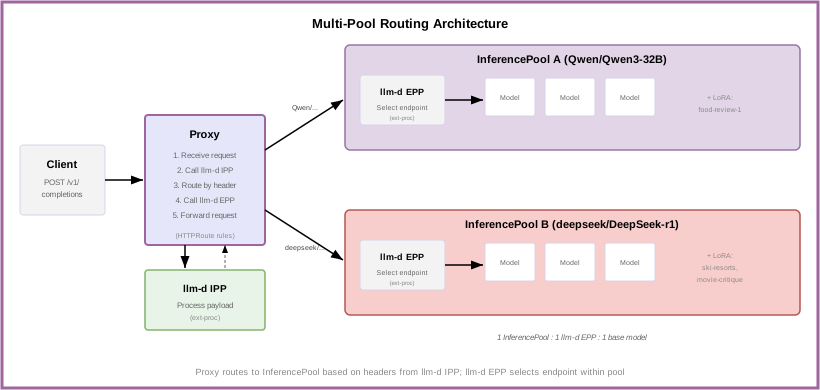
The setup creates multiple InferencePools, each serving a different base model:
- Each InferencePool serves one base model and its LoRA adapters.
- IPP extracts the model name from the request body and maps it to the base model.
- HTTPRoutes match on the
X-Gateway-Base-Model-Nameheader to route to the correct pool. - EPP selects the optimal endpoint within each pool.
During the standard request flow:
- Request arrives at the Proxy with
{"model": "food-review-1"}in the body - Proxy invokes IPP via ext-proc
- IPP looks up
food-review-1→ base modelQwen/Qwen3-32B - IPP sets header
X-Gateway-Base-Model-Name: Qwen/Qwen3-32B - Proxy matches HTTPRoute and routes to
qwen-pool - EPP selects endpoint, preserving the original model name
- Model server loads the
food-review-1LoRA adapter
Prerequisites
-
Have the proper client tools installed on your local system to use this guide.
-
Checkout llm-d repo:
export BRANCH="main" # branch, tag, or commit hashgit clone https://github.com/llm-d/llm-d.git && cd llm-d && git checkout ${BRANCH} -
Set the following environment variables:
export REPO_ROOT=$(realpath $(git rev-parse --show-toplevel))source ${REPO_ROOT}/guides/env.shexport GUIDE_NAME="multi-model-routing"export NAMESPACE="llm-d-multi-model" -
Install the Gateway API Inference Extension CRDs:
# GAIE_URL is automatically calculated from GAIE_VERSION at ${REPO_ROOT}/guides/env.shkubectl apply -f https://github.com/kubernetes-sigs/gateway-api-inference-extension/${GAIE_URL}/v1-manifests.yaml -
Create a target namespace for the installation:
kubectl create namespace ${NAMESPACE} --dry-run=client -o yaml | kubectl apply -f - -
Create the
llm-d-hf-tokensecret in your target namespace with a valid HuggingFace token. -
Multiple InferencePools deployed, each serving a different base model. Follow the Optimized Baseline guide for each pool, or Multi-Inference Pool Setup for adding pools to an existing deployment.
When deploying InferencePools for this guide, do not use --set httpRoute.create=true. This guide's HTTPRoutes (Step 3) handle routing based on model name headers. Pool-level catch-all routes would conflict with header-based routing.
- A Kubernetes Gateway (e.g., Istio, GKE, AgentGateway) deployed in your cluster. See Gateway Infrastructure.
Step 1: Deploy IPP
Clone the IPP repository and deploy using Helm:
# Clone the IPP repository
git clone https://github.com/llm-d/llm-d-inference-payload-processor.git /tmp/ipp

# Install IPP (for Istio)
helm install ipp /tmp/ipp/config/charts/payload-processor \
    --set provider.name=istio \
    --set inferenceGateway.name=llm-d-inference-gateway \
    -n ${NAMESPACE}
For GKE, use --set provider.name=gke instead of istio.
For standalone (no gateway), omit the provider.name flag.
Verify IPP is running:
kubectl get pods -n ${NAMESPACE} -l app=payload-processor
Step 2: Create Model Mapping ConfigMaps
Create ConfigMaps that register each base model with IPP. Review and customize manifests/configmaps.yaml for your models, then apply:
kubectl apply -n ${NAMESPACE} -f ${REPO_ROOT}/guides/multi-model-routing/manifests/configmaps.yaml
Each ConfigMap must have the label inference.llm-d.ai/ipp-managed: "true" and specify a baseModel value matching the model name in API requests.
All model names must be globally unique across all InferencePools.
Step 3: Configure HTTPRoutes
Create HTTPRoutes that match on the X-Gateway-Base-Model-Name header injected by IPP. Review and customize manifests/httproutes.yaml for your setup:
- Update
spec.parentRefs[0].nameto match your Gateway name - Update
backendRefs[0].nameto match your InferencePool names - Ensure the header
valuematches thebaseModelin the corresponding ConfigMap
kubectl apply -n ${NAMESPACE} -f ${REPO_ROOT}/guides/multi-model-routing/manifests/httproutes.yaml
Step 4: Test the Deployment
Get the Gateway IP and send test requests:
export GATEWAY_IP=$(kubectl get gateway llm-d-inference-gateway -n ${NAMESPACE} -o jsonpath='{.status.addresses[0].value}')

# Request to Qwen base model
curl -X POST "http://${GATEWAY_IP}/v1/chat/completions" \
  -H "Content-Type: application/json" \
  -d '{"model": "Qwen/Qwen3-32B", "messages": [{"role": "user", "content": "Hello"}]}'

# Request to DeepSeek base model
curl -X POST "http://${GATEWAY_IP}/v1/chat/completions" \
  -H "Content-Type: application/json" \
  -d '{"model": "deepseek/DeepSeek-r1", "messages": [{"role": "user", "content": "Solve this problem"}]}'
Troubleshooting
Check IPP Logs
kubectl logs -n ${NAMESPACE} -l app=payload-processor --tail=100
Verify ConfigMap Discovery
IPP should log discovered model mappings at startup. Check that your ConfigMaps have the required label:
kubectl get configmap -l inference.llm-d.ai/ipp-managed=true -n ${NAMESPACE}
Verify Routing
Check EPP logs to confirm requests reach the correct pool (replace <pool-name> with your InferencePool name):
kubectl logs -n ${NAMESPACE} -l llm-d-router-gateway=<pool-name>-epp --tail=20
Cleanup
# Remove HTTPRoutes and ConfigMaps
kubectl delete -n ${NAMESPACE} -f ${REPO_ROOT}/guides/multi-model-routing/manifests/httproutes.yaml
kubectl delete -n ${NAMESPACE} -f ${REPO_ROOT}/guides/multi-model-routing/manifests/configmaps.yaml

# Remove IPP
helm uninstall ipp -n ${NAMESPACE}

# Clean up cloned IPP repo
rm -rf /tmp/ipp
# Remove namespace (if no longer needed)
kubectl delete namespace ${NAMESPACE}
Advanced: LoRA Adapter Routing
Once base model routing is working, you can extend ConfigMaps to route LoRA adapter requests to their base model's InferencePool.
Add the adapters field to your ConfigMaps listing the LoRA adapter names:
kubectl apply -n ${NAMESPACE} -f - <<EOF
apiVersion: v1
kind: ConfigMap
metadata:
  name: qwen-model-mapping
  labels:
    inference.llm-d.ai/ipp-managed: "true"
data:
  baseModel: "Qwen/Qwen3-32B"
  adapters: |
    - food-review-1
    - travel-assistant
EOF
When a request comes in with "model": "food-review-1", IPP looks up which base model owns that adapter and sets X-Gateway-Base-Model-Name: Qwen/Qwen3-32B. The HTTPRoute then routes the request to the Qwen pool.
Test LoRA routing:
curl -X POST "http://${GATEWAY_IP}/v1/chat/completions" \
  -H "Content-Type: application/json" \
  -d '{"model": "food-review-1", "messages": [{"role": "user", "content": "Review this restaurant"}]}'
All adapter names must be globally unique across all ConfigMaps.
Further Reading
- IPP Architecture — Technical details of the Inference Payload Processor
- IPP Repository — Source code, configuration reference, and plugin documentation