Qwen3-Coder-480B on TPU 7x
This recipe is optimized for agentic code generation; see the agentic workloads section of the Models overview for the workload framing, and the GLM-5.2 and NVIDIA-Nemotron-3-Ultra guides for the other models benchmarked against the same workload.
Overview
This guide deploys the optimal llm-d configuration for agentic code-generation workload. The configuration includes multiple llm-d optimizations in terms of routing and KV cache management:
- Prefix-aware routing to optimize prefix cache reuse
- KV cache offloading to CPU DRAM to handle multi-turn conversations with long contexts (via KV offloading connector)
- Load balancing to increase cluster-wide accelerator utilization and prevent hot-spotting from bursty request patterns
Default Configuration
| Parameter | Value |
|---|---|
| Model | Qwen/Qwen3-Coder-480B-A35B-Instruct-FP8 |
| Replicas | 8 |
| Accelerator | Google TPU 7x (tpu7x) |
| Topology | 2x2x1 |
| TP size / EP size | TP=8, EP enabled |
Supported Accelerators and Model Servers
This guide includes configurations for the following accelerator and model server combinations:
| Accelerator | ACCELERATOR_TYPE | Served model | vLLM | Notes |
|---|---|---|---|---|
| Google TPU v7x | tpu | Qwen/Qwen3-Coder-480B-A35B-Instruct-FP8 | 🟡 community | GKE only · 8 replicas × 4 chips (tpu7x 2x2x1, TP=8) with CPU KV offloading · TOPOLOGY=disaggregated (experimental): 2 prefill + 6 decode |
✅ validated: covered by a nightly E2E workflow · 🟡 community: maintained by the hardware vendor or community, not covered by nightly E2E · ❌ not supported: tracked in the linked issue · — no configuration.
Set TOPOLOGY to pick the serving topology: unified (default) runs one pool of 8 replicas
with CPU KV offloading; disaggregated is the experimental Prefill/Decode configuration
(2 prefill + 6 decode, see Prefill/Decode Disaggregated Results).
Prerequisites
-
Have the proper client tools installed on your local system to use this guide.
-
A GKE cluster with a TPU v7x (
tpu7x,2x2x1) node pool large enough for 8 replicas (4 chips each). -
Create a HuggingFace token and export it as
HF_TOKENin your shell. -
(Optional) Install the monitoring stack if you plan to enable Prometheus monitoring.
Get the guide
Every command below runs from a local clone of the llm-d repository: the manifests, Helm values, and Kustomize overlays it applies live next to this guide. Set the branch and clone the repo (if you already have a checkout, skip this and run the remaining commands from inside it):
export BRANCH=main
git clone https://github.com/llm-d/llm-d.git && cd llm-d && git checkout ${BRANCH}
Configure the environment
Set the guide-specific environment variables:
export REPO_ROOT=$(realpath $(git rev-parse --show-toplevel))
export GUIDE_NAME=qwen3-coder-480b
export NAMESPACE=llm-d-qwen3-coder-480b
export MONITORING=false # options: false, true
export MONITORING_VALUES=
export ACCELERATOR_TYPE=tpu # options: tpu
export MODEL_SERVER=vllm # options: vllm
export TOPOLOGY=unified # options: unified, disaggregated
export MODEL=Qwen/Qwen3-Coder-480B-A35B-Instruct-FP8 # the model both topologies serve
source ${REPO_ROOT}/guides/env.sh # defines GAIE_VERSION, ROUTER_CHART_VERSION, router chart URLs, and CURL_TEST_IMAGE
Install the Gateway API Inference Extension CRDs:
# GAIE_URL is automatically calculated from GAIE_VERSION at ${REPO_ROOT}/guides/env.sh
kubectl apply -f https://github.com/kubernetes-sigs/gateway-api-inference-extension/${GAIE_URL}/v1-manifests.yaml
(TOPOLOGY=disaggregated only) Install the LeaderWorkerSet controller with the DisaggregatedSet API (skip if your cluster already runs LWS v0.11.1 or newer with enableDisaggregatedSet=true):
# only when TOPOLOGY=disaggregated:
# helm upgrade never updates CRDs, so apply the chart's CRDs first (see LWS
# "Upgrade by Helm"); this upgrades them on clusters that run an older LWS.
helm pull oci://registry.k8s.io/lws/charts/lws --version=${LWS_VERSION} --untar
kubectl apply --server-side --force-conflicts -f lws/crds
helm upgrade --install lws oci://registry.k8s.io/lws/charts/lws \
  --version=${LWS_VERSION} \
  --namespace lws-system --create-namespace \
  --set enableDisaggregatedSet=true \
  --wait --timeout 300s
Create a target namespace for the installation:
kubectl create namespace ${NAMESPACE} --dry-run=client -o yaml | kubectl apply -f -
Create the llm-d-hf-token secret in your target namespace with the key HF_TOKEN matching a valid HuggingFace token to pull models:
kubectl create secret generic llm-d-hf-token \
  --from-literal="HF_TOKEN=${HF_TOKEN}" \
  --namespace "${NAMESPACE}" \
  --dry-run=client -o yaml | kubectl apply -f -
Installation Instructions
1. Deploy the llm-d Router
Prepare the paths to the helm values files for the llm-d router. The P/D disaggregated
topology uses its own router values
(router/qwen3-coder-480b-disagg.values.yaml):
- Unified (Default)
- Disaggregated (Experimental)
# only when TOPOLOGY=unified:
export ROUTER_BASE_VALUES="${REPO_ROOT}/guides/recipes/router/base.values.yaml"
export ROUTER_VALUES="${REPO_ROOT}/guides/models/${GUIDE_NAME}/router/${GUIDE_NAME}.values.yaml"
# only when TOPOLOGY=disaggregated:
export ROUTER_BASE_VALUES="${REPO_ROOT}/guides/recipes/router/base.values.yaml"
export ROUTER_VALUES="${REPO_ROOT}/guides/models/${GUIDE_NAME}/router/${GUIDE_NAME}-disagg.values.yaml"
(Optional) Enable Prometheus monitoring on the llm-d router by defining the helm values file (requires installing the monitoring stack mentioned in Prerequisites):
# only when MONITORING=true:
export MONITORING_VALUES="-f ${REPO_ROOT}/guides/recipes/router/features/monitoring.values.yaml"
peakPrefillThroughput is hardware/model-specific. The router values set
peakPrefillThroughput: 16444, calibrated for Qwen3-Coder-480B-FP8 on TPU 7x. If you
deploy a different model or hardware, measure your own value and update
router/qwen3-coder-480b.values.yaml. See the shared
router calibration tool.
Deploy the router in Standalone Mode, with an Envoy sidecar in front of the router. Keep the release name ${GUIDE_NAME}: the verification steps look up the ${GUIDE_NAME}-epp Service by that name. To front the router with a Kubernetes Gateway instead, see Gateway Mode in the Optimized Baseline.
helm install ${GUIDE_NAME} \
  ${ROUTER_STANDALONE_CHART} \
  -f ${ROUTER_BASE_VALUES} \
  ${MONITORING_VALUES} \
  -f ${ROUTER_VALUES} \
  -n ${NAMESPACE} --version ${ROUTER_CHART_VERSION}
2. Deploy the Model Server
Apply the Kustomize overlay for your topology (the unified overlay enables CPU KV offloading):
- Unified (Default)
- Disaggregated (Experimental)
# only when TOPOLOGY=unified:
kubectl apply -n ${NAMESPACE} \
  -k ${REPO_ROOT}/guides/models/${GUIDE_NAME}/modelserver/${ACCELERATOR_TYPE}/${MODEL_SERVER}/
# only when TOPOLOGY=disaggregated:
kubectl apply -n ${NAMESPACE} \
  -k ${REPO_ROOT}/guides/models/${GUIDE_NAME}/modelserver/${ACCELERATOR_TYPE}/${MODEL_SERVER}-disaggregated/
Wait for the model server to become ready:
# TOPOLOGY=unified
kubectl rollout status deployment/agentic-serving-tpu-vllm-decode -n ${NAMESPACE}
# TOPOLOGY=disaggregated
kubectl wait --for=condition=Available disaggregatedset/pd-disagg-tpu -n ${NAMESPACE} --timeout=1800s
(Optional) Deploy the monitoring resources for model servers (requires installing the monitoring stack mentioned in Prerequisites):
# only when MONITORING=true:
kubectl apply -n ${NAMESPACE} -k ${REPO_ROOT}/guides/recipes/modelserver/components/monitoring-pd
Verification
1. Get the IP of the Proxy
export IP=$(kubectl get service ${GUIDE_NAME}-epp -n ${NAMESPACE} -o jsonpath='{.spec.clusterIP}')
2. Send Test Requests
Send a completion request from a temporary pod inside the cluster:
kubectl run curl-test --rm -i --restart=Never \
  --image=${CURL_TEST_IMAGE} \
  --namespace="${NAMESPACE}" \
  --env="IP=${IP}" \
  --env="MODEL=${MODEL}" \
  -- /bin/sh -c 'curl -sS -X POST "http://${IP}/v1/completions" -H "Content-Type: application/json" -d "{\"model\": \"${MODEL}\", \"prompt\": \"Explain how a simple agent loop works in 3 sentences.\"}"'
Check that the router reaches a model server that serves MODEL: the response must name the model and carry generated tokens:
# The router must reach a model server that serves MODEL and returns tokens
kubectl run serve-check --rm -i --restart=Never \
  --image=${CURL_TEST_IMAGE} \
  --namespace="${NAMESPACE}" \
  --env="IP=${IP}" \
  --env="MODEL=${MODEL}" \
  -- /bin/sh -c 'R=$(curl -sS -X POST "http://${IP}/v1/completions" -H "Content-Type: application/json" -d "{\"model\": \"${MODEL}\", \"prompt\": \"Say hello.\", \"max_tokens\": 16}")
    echo "${R}" | grep -q "\"model\":\"${MODEL}\"" && echo "${R}" | grep -q "\"choices\"" \
      && echo "OK: ${MODEL} served through the router" \
      || { echo "FAIL: ${R}"; exit 1; }'
Benchmarking
This guide comes with an inference-perf benchmark preset (defined in inference-perf.yaml) designed for agentic code-generation workloads with multi-turn interactions and tool usage. The configuration parameters include:
| Workload Characteristic | Metric / Distribution Type | Min | Max | Mean / Constant | Std Dev | Description |
|---|---|---|---|---|---|---|
| Shared System Prompt | Constant | - | - | 3,000 tokens | - | Common base instructions, libraries, and API schemas shared across all agent instances. Highly cacheable. |
| Dynamic System Prompt | Lognormal | 10,000 | 990,000 | 160,000 tokens | 233,600 | Repository context, file indexes, and user-specific code context. Extremely large and variable context. |
| Turns per Conversation | Lognormal | 1 | 3,000 | 540 turns | 48,600 | The depth of the agentic reasoning/conversational loop. Multi-turn interactions require sustaining long-lived sessions. |
| Input Tokens per Turn | Lognormal | 100 | 10,000 | 1,500 tokens | 1,200 | Ongoing prompt extensions (e.g., test logs, user follow-ups, modified code blocks) during conversation. |
| Output Tokens per Turn | Lognormal | 50 | 10,000 | 425 tokens | 825 | Model generations per turn, which are generally smaller than inputs but can spike when generating large files. |
| Tool Call Latency | Lognormal | 1s | 100s | 15 seconds | 55 | Time spent executing tools (compilation, unit tests, web search). Causes idle/delayed turns on the client side. |
1. Run the Benchmark
inference-perf.yaml runs an
inference-perf job that replays the workload
above against the ${GUIDE_NAME}-epp Service. Set the per-run parameters, render it, and apply it:
# Benchmark parameters. CONCURRENCY_LEVEL is the number of concurrent coding sessions
# to drive; NUM_REQUESTS is fixed at 20 per session; SEED is varied per concurrency level
# so prompts don't overlap across runs (matches the published results below).
export CONCURRENCY_LEVEL=40
export NUM_REQUESTS=$((20 * CONCURRENCY_LEVEL))
export SEED=$((7 + CONCURRENCY_LEVEL))

kubectl delete job inference-perf -n ${NAMESPACE} --ignore-not-found
envsubst < ${REPO_ROOT}/guides/models/${GUIDE_NAME}/inference-perf.yaml | kubectl apply -n ${NAMESPACE} -f -
2. Collect the Results
Follow the job's logs until it completes:
kubectl logs -n ${NAMESPACE} job/inference-perf -f
Tuning Prefill-to-Decode Ratios:
The vllm-disaggregated overlay (TOPOLOGY=disaggregated) deploys the optimal 2:6 ratio (2 prefillers, 6 decoders). If you want to evaluate different ratios from the benchmarking report (such as 5:3 or 6:2), you can scale the set's roles directly (role 0 is prefill, role 1 is decode):
kubectl patch disaggregatedset/pd-disagg-tpu -n ${NAMESPACE} --type=json \
  -p '[{"op": "replace", "path": "/spec/roles/0/spec/replicas", "value": 5},
       {"op": "replace", "path": "/spec/roles/1/spec/replicas", "value": 3}]'
Benchmark Results
The results below are with 8 replicas of TPU 7x (2x2x1) on the benchmark workload described above.
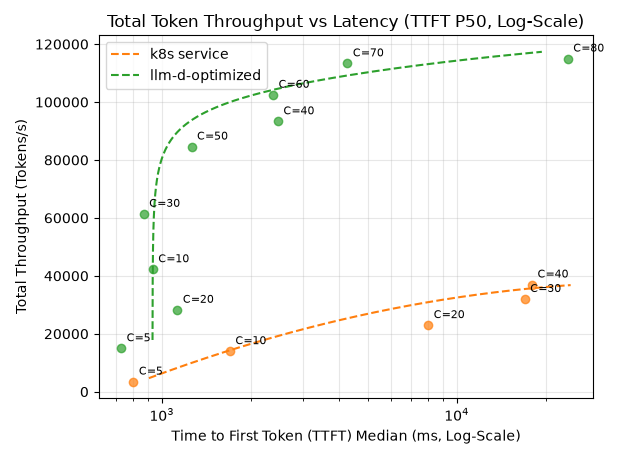
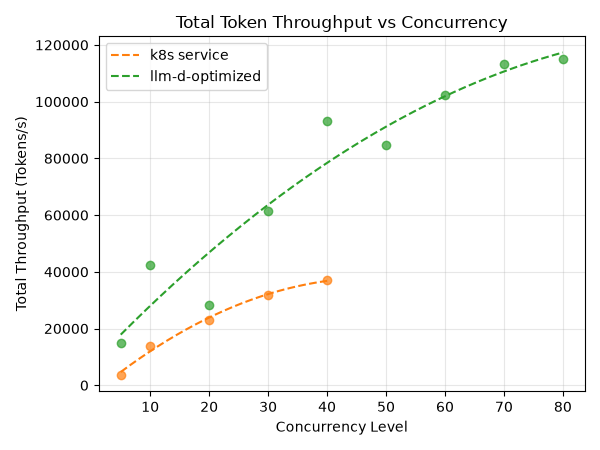
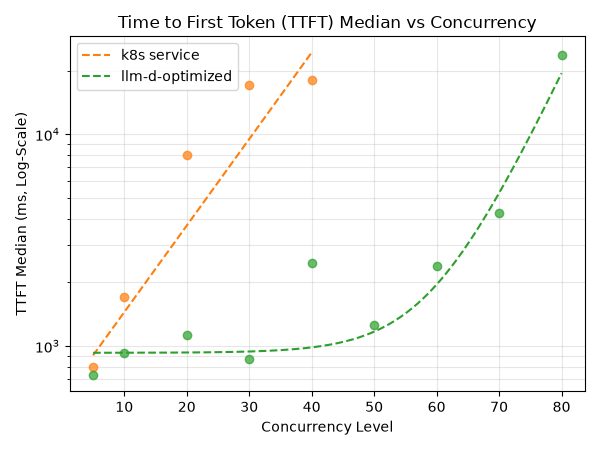
Scaling concurrency up to 80 sessions, the optimized configuration sustains a peak total throughput of ~120K tokens/s, versus ~40K tokens/s for the k8s Service baseline — roughly 3× higher.
Summary with 40 concurrent coding sessions
| Metric | k8s Service | llm-d-optimized | Δ Improvement |
|---|---|---|---|
| TTFT P50 (ms) | 17391 | 2474 | ⬇️ 85.8% |
| Total tokens / sec | 37424 | 93353 | ⬆️ 149.5% |
| Input tokens / sec | 36987 | 92705 | ⬆️ 150.6% |
| Output tokens / sec | 436.8 | 647.5 | ⬆️ 48.2% |
Latency Profiles
Prefill/Decode Disaggregated Results
We also evaluated the P/D disaggregated configuration on TPU 7x with different prefill-to-decode ratios under the same agentic workload framework (average prompt size ~128K tokens, output ~1.1K tokens).
At this scale, the KV cache size is extremely large (~20GB per request), shifting the bottleneck from prefill compute to decoder HBM capacity. Under a concurrency of 40, allocating more TPU nodes to the decode phase (2:6 ratio) yields the best performance by providing sufficient aggregate HBM to avoid severe queueing and swapping:
| Metric | 2:6 (2 Prefill, 6 Decode) | 5:3 (5 Prefill, 3 Decode) | 6:2 (6 Prefill, 2 Decode) |
|---|---|---|---|
| TTFT Median (s) | 7.3 | 158.3 | 329.5 |
| TTFT Mean (s) | 31.2 | 159.2 | 317.9 |
| TTFT P90 (s) | 112.6 | 258.1 | 473.6 |
| TPOT Median (ms) | 260.2 | 1,610.0 | 1,652.5 |
| Input Throughput (tok/s) | 33,515.2 | 14,821.9 | 9,751.2 |
| Output Throughput (tok/s) | 295.1 | 128.8 | 84.2 |
| Error Rate | 2.8% | 2.6% | 2.9% |
Key Takeaways:
- Decoder HBM Capacity is the Bottleneck: With ~128K context, the KV cache size (~20GB) quickly saturates the decoder HBM. Having only 2 decoders (6:2) restricts the active request capacity, leading to severe queueing (TTFT Median of 329.5s).
- Optimal Ratio Shift: Expanding decode capacity to 6 nodes (2:6) increases the aggregate HBM, reducing the TTFT Median by 45x (7.3s) and increasing output throughput by 3.5x (295.1 tok/s).
- Prefill Capacity: Even with only 2 prefillers (2:6), they are able to sustain the required prefill throughput without becoming the primary bottleneck.
- Current Limitations: Without CPU offloading optimizations, this disaggregated TPU configuration currently performs below the unified
llm-d-optimizedbaseline. Integrating these optimizations into TPU disaggregated deployments is an active area of development.
Note: As of June 2026 we are actively working on improving the following for TPU deployments:
- Long context performance
- P/D disaggregation
- KV Cache offloading support
This guide and performance numbers will be updated as further optimizations become available.
Cleanup
To remove the deployed components:
- Unified (Default)
- Disaggregated (Experimental)
# only when TOPOLOGY=unified:
kubectl delete -n ${NAMESPACE} -k ${REPO_ROOT}/guides/models/${GUIDE_NAME}/modelserver/${ACCELERATOR_TYPE}/${MODEL_SERVER}/
# only when TOPOLOGY=disaggregated:
kubectl delete -n ${NAMESPACE} -k ${REPO_ROOT}/guides/models/${GUIDE_NAME}/modelserver/${ACCELERATOR_TYPE}/${MODEL_SERVER}-disaggregated/
helm uninstall ${GUIDE_NAME} -n ${NAMESPACE}

kubectl delete -n ${NAMESPACE} -k ${REPO_ROOT}/guides/recipes/modelserver/components/monitoring-pd --ignore-not-found=true
kubectl delete namespace ${NAMESPACE}