LeaderWorkerSet (LWS)
This page is automatically mirrored from the LeaderWorkerSet documentation in kubernetes-sigs/lws.
LeaderWorkerSet (LWS) is a Kubernetes API designed to deploy and manage a group of pods as a single unit of replication. It addresses common deployment patterns of distributed AI/ML workloads — such as multi-host inference and distributed fine-tuning — where a model is sharded across multiple accelerators spanning multiple nodes that must be scheduled, scaled, and managed together.
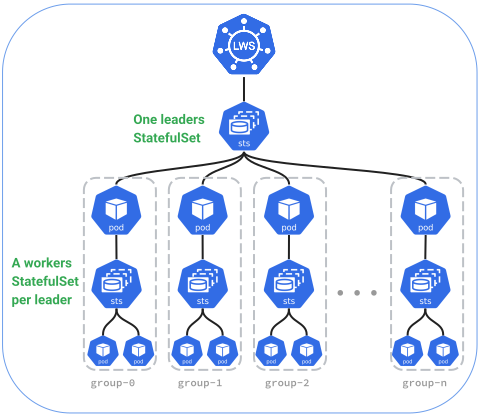
Architecture and Relationship with StatefulSet
Under the hood, LeaderWorkerSet implements an API composition pattern on top of native Kubernetes primitives. Rather than managing individual pods directly, LWS composes two tiers of StatefulSets:
LeaderWorkerSet (spec.replicas = 2, size = 4)
│
└── Leader StatefulSet: "<lws-name>" (replicas = 2)
    │
    ├── Replica 0
    │   ├── Leader Pod:         <lws-name>-0
    │   └── Worker StatefulSet: "<lws-name>-0" (replicas = 3, startOrdinal = 1)
    │       ├── Worker Pod:     <lws-name>-0-1  (ordinal 1)
    │       ├── Worker Pod:     <lws-name>-0-2  (ordinal 2)
    │       └── Worker Pod:     <lws-name>-0-3  (ordinal 3)
    │
    └── Replica 1
        ├── Leader Pod:         <lws-name>-1
        └── Worker StatefulSet: "<lws-name>-1" (replicas = 3, startOrdinal = 1)
            ├── Worker Pod:     <lws-name>-1-1  (ordinal 1)
            ├── Worker Pod:     <lws-name>-1-2  (ordinal 2)
            └── Worker Pod:     <lws-name>-1-3  (ordinal 3)
How LWS Manages Pods
- Leader StatefulSet: The LWS controller creates a single Leader StatefulSet named
<lws-name>withspec.replicasmatching the LWS replica count. This StatefulSet generates the leader pods (<lws-name>-0,<lws-name>-1, ...,<lws-name>-(R-1)), usingleaderTemplate(orworkerTemplateifleaderTemplateis omitted). - Worker StatefulSets: For each leader pod, the controller creates a corresponding Worker StatefulSet named
<lws-name>-<replica-index>withreplicas = size - 1andstartOrdinal = 1. This creates the worker pods (<lws-name>-<replica-index>-1through<lws-name>-<replica-index>-(size-1)), usingworkerTemplate. - Headless Service: A headless service is created for each replica (or shared across the set) to enable predictable, direct pod-to-pod DNS resolution.
Why StatefulSet Was Selected for API Composition
StatefulSet was chosen as the underlying building block for both leader and worker pods due to several critical capabilities required by distributed AI/ML workloads:
The leader StatefulSet described here is the default Ordinal group identity. LWS also offers a Hash mode that manages leaders with a Deployment for workloads that do not need stable per-group identity. See Group Identity.
1. Deterministic Ordinal Identity and Predictable Networking
Distributed training and inference frameworks (such as PyTorch DDP/FSDP, Megatron-LM, vLLM, TensorRT-LLM, and SGLang) rely on static rank assignment (RANK 0..N-1, WORLD_SIZE), peer identification, and deterministic rendezvous.
- Leader StatefulSet assigns deterministic replica indices (
0, 1, ..., R-1). - Worker StatefulSets assign deterministic worker indices (
1, 2, ..., size-1). - In combination with headless services, every leader and worker pod receives a stable, predictable DNS name (
<pod-name>.<service-name>.<namespace>.svc.cluster.local), eliminating the need for complex dynamic discovery protocols or external service registries.
2. Native Dynamic Storage (volumeClaimTemplates)
Distributed AI models often require dedicated local storage for caching large model checkpoints, tokenizers, or intermediate KV caches on high-speed NVMe drives attached to each node.
- StatefulSet has built-in support for
volumeClaimTemplates, which automatically provisions dedicated, persistent storage per pod ordinal. - By composing with StatefulSet, LWS inherits automatic volume provisioning for both leader and worker pods without needing custom volume controllers.
3. Parallel Pod Management
While traditional stateful services (such as databases) deploy pods sequentially, distributed AI/ML replicas require all pods in a group to start simultaneously to establish collective communication (MPI/NCCL) and avoid idle accelerator time.
- LWS configures the worker StatefulSets with
podManagementPolicy: Parallel, allowing all worker pods in a group to be created and initialized concurrently while preserving their deterministic ordinal names and storage bindings.
4. Partitioned Rolling Updates
StatefulSet natively supports partition-based rolling updates (.spec.updateStrategy.rollingUpdate.partition).
- LWS leverages this mechanism on the Leader StatefulSet to implement group-level rolling updates (
maxUnavailableandmaxSurge), updating replicas in controlled batches while keeping the active serving capacity intact.
5. Kubernetes API Composition Best Practices
Building on top of StatefulSet adheres to Kubernetes design principles by reusing battle-tested core controllers:
- The core Kubernetes StatefulSet controller reliably manages low-level container restarts, volume attachments, pod creation retries, and API interactions.
- LeaderWorkerSet focuses on the higher-level group abstractions that Kubernetes does not provide natively:
- Treating a heterogeneous group of pods (leader + workers) as a single replication unit.
- Group-level failure detection and all-or-nothing restart policies.
- 1:1 exclusive topology placement for an entire pod group (e.g., rack or block).
- Group-level rolling updates and coordinated rollouts.
- Subgroup partitioning for heterogeneous scheduling (CPU leader + GPU workers).
Dual Pod Templates
LeaderWorkerSet supports defining distinct specifications for leader and worker pods within a replica.
Leader and Worker Templates
An LWS replica consists of one leader pod and N - 1 worker pods (where N is defined by .spec.leaderWorkerTemplate.size). size can be changed on a running LeaderWorkerSet, which recreates every pod in every group. See Resizing.
You can configure pod specifications using two template fields:
workerTemplate(required): Defines the pod template for worker pods. IfleaderTemplateis not specified,workerTemplateapplies to the leader pod as well.leaderTemplate(optional): Defines a distinct pod template exclusively for the leader pod.
apiVersion: leaderworkerset.x-k8s.io/v1
kind: LeaderWorkerSet
metadata:
  name: leaderworkerset-sample
spec:
  replicas: 3
  leaderWorkerTemplate:
    size: 4
    leaderTemplate:
      spec:
        containers:
        - name: leader
          image: leader-coordinator:latest
          resources:
            requests:
              cpu: "2"
              memory: 4Gi
    workerTemplate:
      spec:
        containers:
        - name: worker
          image: worker-engine:latest
          resources:
            limits:
              nvidia.com/gpu: "8"
Common Use Cases
-
Heterogeneous Hardware: The leader pod can run as a coordinator, HTTP frontend, or driver on standard CPU nodes, while the worker pods run distributed model parallel computation on specialized GPU or TPU accelerator nodes.
-
Different Container Images or Configurations: The leader pod can run specialized tooling, telemetry sidecars, or API server processes that are not needed on worker pods.
-
Homogeneous Deployments: When leader and worker pods share the same container configuration, omit
leaderTemplateand specify onlyworkerTemplate. LWS will applyworkerTemplateto all pods in the replica.
Startup Policy
The .spec.startupPolicy field controls when the worker StatefulSet is created relative to the leader pod in each replica.
Available Policies
LeaderWorkerSet supports two startup policies:
1. LeaderCreated (Default)
The LWS controller creates the worker StatefulSet as soon as the leader Pod object is created in the Kubernetes API.
- Behavior: Leader and worker pods are created in parallel.
- Readiness: Does not guarantee that the leader is
Readybefore workers begin starting or running. - Use case: Distributed workloads where leader and worker initialization can proceed concurrently, or where pods coordinate synchronization directly over the network during bootstrap.
apiVersion: leaderworkerset.x-k8s.io/v1
kind: LeaderWorkerSet
metadata:
  name: leaderworkerset-sample
spec:
  startupPolicy: LeaderCreated
  replicas: 3
  leaderWorkerTemplate:
    size: 4
    workerTemplate:
      spec:
        containers:
        - name: worker
          image: worker-image:latest
2. LeaderReady
The LWS controller delays creating the worker StatefulSet until the leader Pod has achieved the Ready condition.
- Behavior: The leader pod must successfully pass its readiness probes and reach the
Readystate before worker pods are scheduled or started. - Readiness: Guarantees that the leader is fully initialized and operational before workers are created.
- Use case: Scenarios where the leader acts as a central coordinator, parameter server, or discovery registry that must be fully active and reachable before workers attempt to register or pull state.
apiVersion: leaderworkerset.x-k8s.io/v1
kind: LeaderWorkerSet
metadata:
  name: leaderworkerset-sample
spec:
  startupPolicy: LeaderReady
  replicas: 3
  leaderWorkerTemplate:
    size: 4
    leaderTemplate:
      spec:
        containers:
        - name: coordinator
          image: coordinator-image:latest
          readinessProbe:
            httpGet:
              path: /healthz
              port: 8080
            initialDelaySeconds: 5
            periodSeconds: 5
    workerTemplate:
      spec:
        containers:
        - name: worker
          image: worker-image:latest
Exclusive Topology Placement
Large distributed AI/ML workloads require high-bandwidth, low-latency inter-node communication (e.g., NVLink, RoCE, or InfiniBand) between pods participating in tensor-parallel or pipeline-parallel model execution.
LeaderWorkerSet provides topology-aware placement features to ensure that all pods within an LWS replica land in the same physical topology domain.
Exclusive Topology Annotation
The annotation leaderworkerset.sigs.k8s.io/exclusive-topology defines a 1:1 mapping between an LWS replica and a topology domain.
apiVersion: leaderworkerset.x-k8s.io/v1
kind: LeaderWorkerSet
metadata:
  name: leaderworkerset-sample
  annotations:
    leaderworkerset.sigs.k8s.io/exclusive-topology: topology.kubernetes.io/zone
spec:
  replicas: 3
  leaderWorkerTemplate:
    size: 4
    workerTemplate:
      spec:
        containers:
        - name: worker
          image: worker-image:latest
Common topology keys include:
topology.kubernetes.io/zonekubernetes.io/hostname- Custom node labels representing racks, blocks, or network switches (e.g.,
cloud.google.com/gke-placement-group,topology.kubernetes.io/rack, ortopology.kubernetes.io/block).
How It Works
-
Topology Constraint Enforcement: When an LWS replica is created, the LWS controller configures pod affinity/anti-affinity rules so that all pods belonging to a single replica (the leader and its workers) must be scheduled within the same topology domain instance (e.g., the same rack).
-
Mutual Exclusivity: Pods from different replicas will not share the same topology domain instance if exclusive placement is requested, preventing noisy-neighbor interference and optimizing cross-node bandwidth.
-
Subgroup Placements: If you need exclusive placement for subsets of pods within a replica (e.g., placing workers on GPU racks while the leader runs on CPU nodes), use Subgroups in combination with
leaderworkerset.sigs.k8s.io/subgroup-exclusive-topology.
Gang Scheduling
Native gang scheduling uses the Kubernetes Workload-Aware Scheduling APIs to
admit related pods as a unit. LWS owns the Workload and PodGroup objects
and sets each managed pod's spec.schedulingGroup; users express the intent
only on the LeaderWorkerSet.
Gang scheduling is opt-in. A LeaderWorkerSet without spec.scheduling keeps
the normal pod-by-pod scheduling behavior and LWS creates no native scheduling
objects.
Scheduling levels
LWS supports three mutually exclusive scheduling levels in spec.scheduling:
- Replica level (
spec.scheduling.replica, orspec.scheduling: {}): OnePodGroupper replica covering its leader and workers together (sizepods). - Whole-LWS level: Set a top-level
schedulingPolicy,schedulingConstraints, ordisruptionModeunderspec.scheduling, for examplespec.scheduling.schedulingPolicy.gang: {}. This creates onePodGroupfor the entire LeaderWorkerSet (replicas * sizepods across all replicas). While a rollout increasessize, itsgang.minCountcounts the replicas that the rollout has not replaced yet with their previous size. The gang admits the initial replicas together; during a rollout, once the running pods meetgang.minCount, the pods of a replacement or surge replica can be placed one at a time rather than all-or-nothing. - Role level (
spec.scheduling.replica.leaderorspec.scheduling.replica.worker): Setting either role selects this level. LWS creates separatePodGroupobjects for the leader and workers within each replica.
Phase 1 accepts exactly one active scheduling level. Hierarchical gang-of-gangs scheduling is not supported, and the active level cannot be changed after creation.
Per-replica default
The shortest opt-in is the replica level:
spec:
  scheduling: {}
An empty scheduling block selects the replica level (spec.scheduling.replica) and defaults to a gang policy. For an
LWS with replicas: R and leaderWorkerTemplate.size: S, LWS creates:
- one
Workloadcontaining a stable replica PodGroup template; and - one runtime
PodGroupper active replica, each withgang.minCount: S.
Each replica's leader and workers are therefore admitted together, while
different replicas remain independent. One replica can run without waiting
for capacity for every other replica in the LWS. Scaling replicas adds or
removes independent PodGroups, and changing size updates the derived gang
membership as part of the LWS rollout. Replicas that the rollout has not
replaced yet keep PodGroups with the gang.minCount of their previous size.
When a parent controller owns the Workload (the
scheduling.k8s.io/group-template-name annotation), the parent's template
sets gang.minCount instead, and it can follow only one size. Existing
PodGroups keep the minimum they were created with, and new ones take the
template's current minimum, including the PodGroups of a replica of the
previous size that is recreated before the rollout replaces it.
LWS creates the Workload before creating member pods. Runtime PodGroup
creation depends on the scheduling level:
- At the whole-LWS level, the
PodGroupname does not depend on a replica, so LWS creates it before member pods in both group identity modes. - At the replica or role level, leader pods are created with a scheduling
gate (
leaderworkerset.sigs.k8s.io/group-replacement). The pod controller creates the runtimePodGroupobjects of a replica while reconciling its gated leader pod, before clearing the gate and creating workers.
At the replica and role levels, every leader pod gets PodGroup objects of
its own, so a recreated leader never waits on a PodGroup of its predecessor
that is being deleted:
- In Hash mode (
spec.groupIdentity: Hash), thePodGroupnames contain the group key that admission generates for each leader pod. - In Ordinal mode (the default
spec.groupIdentity: Ordinal), a recreated leader keeps its name, group index, and revision, so admission adds a random 5-character group incarnation to the names:<lws-name>-<uid-hash>.<incarnation>-<group-index>[-<role>]-<revision>. Workers inherit the incarnation of their leader.
In all cases, LWS sets spec.schedulingGroup.podGroupName on each pod so kube-scheduler can match member pods to the correct gang.
Compatibility and update restrictions
Native scheduling is an alpha feature. See the installation requirements for the supported LWS and Kubernetes versions, cluster feature gate, LWS feature gate, and scheduler provider.
The initial implementation has these important restrictions:
- Set
spec.schedulingwhen the LeaderWorkerSet is created. It cannot be added or removed later, and the active scheduling level (whole-LWS, replica, or role) cannot change. - The default
startupPolicy: LeaderCreatedis compatible with a per-replica gang.LeaderReadyis rejected because workers are not created until the leader is ready, so the complete gang could never form. - Do not set
spec.schedulingGroupin the leader or worker pod template. LWS derives and sets revision-aware PodGroup names. - Gang scheduling cannot be combined with the
leaderworkerset.sigs.k8s.io/exclusive-topologyannotation in this alpha release. - Leader and worker templates must use the same
priorityClassName. That effective priority class cannot change after creation. - Phase 1 accepts exactly one active scheduling level among whole-LWS
(top-level policy, constraints, or disruption mode), replica
(
spec.scheduling.replica), and role (spec.scheduling.replica.leaderorspec.scheduling.replica.worker). Hierarchical gang-of-gangs scheduling is not supported.
schedulingPolicy, schedulingConstraints, disruptionMode, and
resourceClaims are immutable after creation (except gang.minCount, which
follows replica count and group size).
At the replica level, LWS derives runtime PodGroup instances and gang
membership from replicas and size, so ordinary replica scaling and size
changes remain supported.
WorkloadSchedulingCreated=True on the LeaderWorkerSet means LWS created the
requested scheduling objects. It does not mean the gang was placed or that
the replica is healthy. Use PodGroup conditions and pod placement to inspect
scheduler progress, as shown in the quickstart.
Upgrading LWS
Upgrading LWS does not restart running replicas. Replicas whose leader pod was
admitted by an earlier version keep their PodGroup objects, named without a
group incarnation, until their leader pod is recreated.
While the upgrade rolls out, the pod webhook and the controller can briefly
run different LWS versions. If the new webhook admits a leader pod whose
workers the earlier controller then creates, the leader and its workers join
different PodGroup objects. LWS recreates such a replica by deleting its
leader pod, as long as none of its workers is scheduled, and records a
RecreateGroup event.
Downgrading LWS keeps running replicas running. A replica that the newer
version admitted but that has not started yet can wait for PodGroup objects
the earlier version does not create. Delete its leader pod to recreate it.
Whenever an earlier controller runs, while an upgrade rolls out or after a
downgrade, it also creates a PodGroup named without a group incarnation for
each replica whose leader pod carries one. No pod of that replica references
it, so it is harmless. The newer controller deletes it the next time it
reconciles the LeaderWorkerSet. After a downgrade, the earlier controller keeps
it for as long as the leader pod exists.
Subgroups
A SubGroup represents a logical subdivision of Pods within an LWS replica. While LWS manages all pods in a replica as a single lifecycle unit, SubGroups (introduced in KEP-115 and KEP-257) allow you to define smaller scheduling and placement units within the larger group.
This is especially helpful when subsets of Pods have tighter coordination requirements (such as tensor-parallel groups across high-speed interconnects) or differing hardware requirements (such as a CPU leader orchestrating GPU workers).
SubGroup Sizing
The subGroupSize field inside .spec.leaderWorkerTemplate.subGroupPolicy determines the number of pods in each subgroup.
spec:
  leaderWorkerTemplate:
    size: 16
    subGroupPolicy:
      subGroupSize: 8
Sizing constraints:
subGroupSizemust not be greater thansize.sizemust be divisible bysubGroupSize(yielding equal-sized subgroups underLeaderWorker), orsize - 1must be divisible bysubGroupSize(where the leader is an extra pod in the first subgroup underLeaderWorker, or excluded underLeaderExcluded).
subGroupSize cannot be changed after the LeaderWorkerSet is created, while size can. Both constraints above are re-checked on every update, so a resize that no longer fits subGroupSize is rejected.
SubGroup Policy Types
The subGroupPolicyType field (.spec.leaderWorkerTemplate.subGroupPolicy.subGroupPolicyType) defines how leader and worker pods are partitioned into subgroups:
| Policy Type | Leader Inclusion | Sizing Requirement | Subgroup Partitioning |
|---|---|---|---|
LeaderWorker (Default) | Leader is included in the first subgroup | size or size - 1 divisible by subGroupSize | • If (size - 1) divisible: (0, 1, ... subGroupSize), (subGroupSize + 1, ... 2*subGroupSize), ...• If size divisible: (0, 1, ... subGroupSize - 1), (subGroupSize, ... 2*subGroupSize - 1), ... |
LeaderExcluded | Leader is excluded from all subgroups | size - 1 must be divisible by subGroupSize | Worker pods form equal subgroups: (1, ... subGroupSize), (subGroupSize + 1, ... 2*subGroupSize), ... |
1. LeaderWorker (Default)
LeaderWorker includes the leader pod in the first subgroup (Subgroup 0):
- If
size - 1is divisible bysubGroupSize, the leader is treated as the extra pod in Subgroup 0 (0, 1, ... subGroupSize), and all subsequent subgroups containsubGroupSizeworkers. - If
sizeis divisible bysubGroupSize, all subgroups contain exactlysubGroupSizepods (Subgroup 0 contains the leader andsubGroupSize - 1workers).
apiVersion: leaderworkerset.x-k8s.io/v1
kind: LeaderWorkerSet
metadata:
  name: leaderworkerset-sample
spec:
  replicas: 2
  leaderWorkerTemplate:
    size: 16
    subGroupPolicy:
      subGroupPolicyType: LeaderWorker
      subGroupSize: 8
    workerTemplate:
      spec:
        containers:
        - name: worker
          image: worker-image:latest
2. LeaderExcluded
LeaderExcluded excludes the leader pod from all subgroups so it can be scheduled independently, while worker pods are partitioned into equal subgroups according to subGroupSize.
This policy requires (size - 1) to be divisible by subGroupSize.
apiVersion: leaderworkerset.x-k8s.io/v1
kind: LeaderWorkerSet
metadata:
  name: leaderworkerset-sample
spec:
  replicas: 2
  leaderWorkerTemplate:
    size: 9
    subGroupPolicy:
      subGroupPolicyType: LeaderExcluded
      subGroupSize: 8
    leaderTemplate:
      spec:
        nodeSelector:
          node.kubernetes.io/instance-type: cpu-standard
        containers:
        - name: leader
          image: leader-image:latest
    workerTemplate:
      spec:
        nodeSelector:
          node.kubernetes.io/instance-type: gpu-accelerated
        containers:
        - name: worker
          image: worker-image:latest
Key Benefits of LeaderExcluded
- Heterogeneous Scheduling: Allows placing the leader pod on standard CPU nodes while placing all worker pods on GPU/TPU nodes.
- Independent Placement: Workers can be co-located on specialized accelerator racks without requiring the leader to consume accelerator node capacity.
Subgroup Exclusive Placement
The annotation leaderworkerset.sigs.k8s.io/subgroup-exclusive-topology defines a 1:1 mapping between an LWS subgroup and a topology domain:
apiVersion: leaderworkerset.x-k8s.io/v1
kind: LeaderWorkerSet
metadata:
  name: leaderworkerset-sample
  annotations:
    leaderworkerset.sigs.k8s.io/subgroup-exclusive-topology: topology.kubernetes.io/rack
spec:
  replicas: 2
  leaderWorkerTemplate:
    size: 8
    subGroupPolicy:
      subGroupSize: 4
    workerTemplate:
      spec:
        containers:
        - name: worker
          image: worker-image:latest
In this example, each 4-pod subgroup is scheduled onto its own exclusive rack, while the overall 8-pod replica can span across racks within the same zone or cluster.
Volume Claim Templates Support
LeaderWorkerSet supports the use of volumeClaimTemplates for provisioning dedicated PersistentVolumeClaims (PVCs) for leader and worker pods within each replica.
Defining volumeClaimTemplates
You can declare a list of volumeClaimTemplates inside .spec.leaderWorkerTemplate. These templates are used to dynamically provision persistent storage across all pods in the LWS replicas.
Containers in leaderTemplate and workerTemplate can then reference the claim templates by name in their volumeMounts:
apiVersion: leaderworkerset.x-k8s.io/v1
kind: LeaderWorkerSet
metadata:
  name: lws-storage-sample
spec:
  replicas: 2
  leaderWorkerTemplate:
    size: 4
    volumeClaimTemplates:
      - metadata:
          name: model-cache
        spec:
          storageClassName: standard-rwo
          accessModes: ["ReadWriteOnce"]
          resources:
            requests:
              storage: 100Gi
    leaderTemplate:
      spec:
        containers:
          - name: leader
            image: leader-image:latest
            volumeMounts:
              - mountPath: /mnt/models
                name: model-cache
    workerTemplate:
      spec:
        containers:
          - name: worker
            image: worker-image:latest
            volumeMounts:
              - mountPath: /mnt/models
                name: model-cache
How It Works
- Independent PVC Provisioning: Each pod created by LWS (both leader and workers) receives its own dedicated PVC instantiated from the template.
- Lifecycle Management:
PVCs created via
volumeClaimTemplatesfollow standard Kubernetes volume lifecycle rules and are preserved across individual container restarts. - Common Use Cases:
- Local Model Weights Caching: Caching large model weights, checkpoints, or tokenizer assets on high-performance block storage (e.g. SSDs) attached to each pod.
- Scratch Space: Providing scratch space for distributed tensor serialization or intermediate KV cache storage.
Rollout Strategy
Rolling update is vital to online services requiring high availability and zero downtime. For LLM inference services, this is particularly important to mitigate stockout and maintain serving capacity during updates.
LeaderWorkerSet supports three parameters within .spec.rolloutStrategy.rollingUpdateConfiguration:
maxUnavailable: Maximum number (or percentage) of replicas (groups of pods) allowed to be unavailable during the update, relative tospec.replicas(percentages are rounded down). Defaults to1.maxSurge: Maximum number (or percentage) of extra replicas that can be created abovespec.replicasduring the update (percentages are rounded up; inOrdinalmode, surge is capped atspec.replicas). Defaults to0.partition: Lowest ordinal updated to the new template during a rolling update. Replicas withordinal >= partitionreceive the new template, while replicas withordinal < partitionstay on the previous revision. Defaults to0. Only supported when.spec.groupIdentityisOrdinal.
maxSurge and maxUnavailable cannot both be zero at the same time.
Example Configuration
Here is a LeaderWorkerSet configured with a rolling update strategy (see a full runtime example here):
apiVersion: leaderworkerset.x-k8s.io/v1
kind: LeaderWorkerSet
metadata:
  name: leaderworkerset-sample
spec:
  rolloutStrategy:
    type: RollingUpdate
    rollingUpdateConfiguration:
      maxUnavailable: 2
      maxSurge: 2
  replicas: 4
  leaderWorkerTemplate:
    size: 4
    workerTemplate:
      spec:
        containers:
        - name: nginx
          image: nginxinc/nginx-unprivileged:1.27
Rolling Update Process
In both Group Identity modes (Ordinal and Hash), maxUnavailable and maxSurge operate on complete leader-worker groups: a group counts as ready only when its leader pod and all of its worker pods are Ready.
Ordinal Mode (Default)
In Ordinal mode, leader pods are managed by a StatefulSet. The controller drives the rollout by coordinating the leader StatefulSet's replicas and partition from highest ordinal to lowest:
- Surge creation: If
maxSurge > 0, the controller temporarily scales the leader StatefulSet up tospec.replicas + maxSurgeand setspartitiontospec.replicas. - Batch progression: The controller lowers
partitiontoward0(or.spec.rolloutStrategy.rollingUpdateConfiguration.partition) in steps bounded bymaxUnavailableand active surge groups, waiting for higher ordinals (leader and workers) to be updated andReadybefore advancing. - Surge reclamation: Once the remaining unready target groups (
0throughspec.replicas - 1) fit withinmaxUnavailable, the controller scales the leader StatefulSet back down tospec.replicas.
Below is a step-by-step trace for 4 replicas with maxUnavailable=2 and maxSurge=2 (step size = maxUnavailable + maxSurge = 4).
Status indicators:
- ✅ Replica has been updated to the new revision
- ❎ Replica has not yet been updated (running old revision)
- ⏳ Replica is currently undergoing rolling update (not yet ready)
| Stage | Partition | Replicas | R-0 | R-1 | R-2 | R-3 | R-4 (Surge) | R-5 (Surge) | Description |
|---|---|---|---|---|---|---|---|---|---|
| Stage 1 | 0 | 4 | ✅ | ✅ | ✅ | ✅ | Before the rolling update | ||
| Stage 2 | 4 | 6 | ❎ | ❎ | ❎ | ❎ | ⏳ | ⏳ | Rolling update starts; 2 surge replicas created |
| Stage 3 | 2 | 6 | ❎ | ❎ | ⏳ | ⏳ | ⏳ | ⏳ | Partition decreases to 2; R-2 & R-3 begin update |
| Stage 4 | 2 | 6 | ❎ | ❎ | ⏳ | ⏳ | ✅ | ⏳ | R-4 becomes ready; partition waits for R-5 |
| Stage 5 | 0 | 6 | ⏳ | ⏳ | ⏳ | ⏳ | ✅ | ✅ | R-5 becomes ready; partition drops to 0; R-0 & R-1 begin update |
| Stage 6 | 0 | 6 | ⏳ | ⏳ | ✅ | ✅ | ✅ | ✅ | R-2 and R-3 become ready |
| Stage 7 | 0 | 4 | ⏳ | ⏳ | ✅ | ✅ | Scaled down to 4 replicas; surge replicas reclaimed | ||
| Stage 8 | 0 | 4 | ⏳ | ✅ | ✅ | ✅ | R-1 becomes ready | ||
| Stage 9 | 0 | 4 | ✅ | ✅ | ✅ | ✅ | R-0 becomes ready; rolling update complete |
Hash Mode
When .spec.groupIdentity is Hash, leader pods are managed by a Deployment instead of a StatefulSet, and each new group gets a fresh random identity rather than updating an ordinal in place (see Group Identity for details):
- Deployment-driven rollout:
maxUnavailableandmaxSurgeare passed directly to the leader Deployment'sRollingUpdatestrategy, which scales up the newReplicaSetand scales down the oldReplicaSet. (partitionis not supported inHashmode.) - Whole-group readiness: Multi-pod groups use the
leaderworkerset.sigs.k8s.io/group-readyreadiness gate on the leader pod, which becomesTrueonly after all workers in the group areReady. The Deployment therefore counts a leader as available—and frees budget to terminate another old group—only when its entire group is ready. - Replacement pacing: New leader pods start with the
leaderworkerset.sigs.k8s.io/group-replacementscheduling gate:- With
groupReplacementPolicy: PostTermination(default), surge groups are ungated immediately, while replacement groups staySchedulingGated(without creating workers) until the terminating old group's leader and worker pods are fully removed. - With
groupReplacementPolicy: Immediate, replacement groups are ungated immediately without waiting for old groups to finish terminating. - At most
spec.replicasgroups on a given revision are ungated at the same time; any extra pods created bymaxSurgebeyondspec.replicasstay gated and are removed first when scaling down.
- With
Below is a trace in Hash mode (groupReplacementPolicy: PostTermination) for 2 replicas with maxUnavailable=1 and maxSurge=1:
| Stage | Old Groups (rev1) | New Groups (rev2) | Description |
|---|---|---|---|
| Stage 1 | G-aaa ✅, G-bbb ✅ | none | Steady state before rolling update (2 available groups). |
| Stage 2 | G-aaa ✅, G-bbb 🗑️ (tearing down) | G-ccc ⏳ (surge, ungated)G-ddd 🔒 (SchedulingGated) | Deployment creates G-ccc (surge) and G-ddd (replacement) on rev2 and terminates G-bbb. G-ccc is ungated immediately; G-ddd waits for G-bbb (leader + workers) to finish terminating. |
| Stage 3 | G-aaa ✅ | G-ccc ⏳, G-ddd ⏳ (ungated) | G-bbb finishes terminating. G-ddd is ungated and creates its workers. |
| Stage 4 | G-aaa 🗑️ (tearing down) | G-ccc ✅, G-ddd ⏳ | G-ccc becomes ready, restoring 2 available groups (G-aaa + G-ccc). The Deployment terminates G-aaa. |
| Stage 5 | none | G-ccc ✅, G-ddd ✅ | G-aaa finishes terminating and G-ddd becomes ready. Rollout complete on rev2. |
Combined Template Update and Scale-Up
When .spec.leaderWorkerTemplate and .spec.replicas (scaling up from oldReplicas to newReplicas) are updated together—or when spec.replicas is scaled up mid-rollout—both modes follow the same rules:
- Added capacity comes up on the new revision:
- In
Ordinalmode, the controller setspartition = oldReplicaswhile scaling tonewReplicas, so new ordinals (oldReplicas .. newReplicas - 1) are created directly with the new template. - In
Hashmode, although the Deployment controller briefly scales the oldReplicaSetbefore rolling to the newReplicaSet, gating prevents outdated leader pods from ever scheduling or creating workers; they are immediately deleted as the newReplicaSetscales up.
- In
- Unready scaled-up groups count against
maxUnavailable(evaluated relative tonewReplicas):- If
newReplicas - oldReplicas >= maxUnavailable: No existing old-revision groups are disrupted initially. Existing groups keep running until enough new groups become ready to free room withinmaxUnavailable. - If
newReplicas - oldReplicas < maxUnavailable: Up tomaxUnavailable - (newReplicas - oldReplicas)existing old-revision groups begin updating immediately alongside the newly added groups.
- If
Resource Deadlock When Reducing Per-Group Resources During Scale-Up (#717)
On capacity-constrained clusters (for example, a fixed pool of 8 GPUs), a common operation is halving per-group resources while doubling spec.replicas in a single update (such as 1 × 8 GPUs -> 2 × 4 GPUs, or 4 × 8 GPUs -> 8 × 4 GPUs) with default rollout settings (maxUnavailable: 1, maxSurge: 0).
Because newReplicas - oldReplicas >= maxUnavailable, this update deadlocks in both modes: the controller refuses to terminate any old 8-GPU group until a new 4-GPU group becomes ready, but the new 4-GPU groups stay Pending because the existing 8-GPU groups still occupy all cluster GPUs.
To avoid or recover from this state:
- Update in two steps (recommended):
- First update
.spec.leaderWorkerTemplateto the smaller per-group resource request while keepingspec.replicasunchanged. Once existing groups roll and free capacity, scalespec.replicasup.
- First update
- Increase
maxUnavailableabove the scale-up delta (maxUnavailable > newReplicas - oldReplicas):- In
Hashmode: SettingmaxUnavailableto at least(newReplicas - oldReplicas) + 1(e.g.2for1 -> 2, or5for4 -> 8) lets the Deployment immediately terminate one old8-GPU group. Once it exits, two new4-GPU groups fit into the freed capacity, and because any ready group increases Deployment availability regardless of order, the remaining old groups cascade through the rollout. - In
Ordinalmode: Becausepartitiononly steps down as tail ordinals become contiguously ready from the highest ordinal (newReplicas - 1) downward, freeing capacity for a lower pending ordinal (such asR-4whileR-7staysPending) does not advancepartition. When multiple scaled-up ordinals arePending, single-step recovery requires settingmaxUnavailable: 100%(ornewReplicas) sopartitiondrops to0immediately.
- In
MaxUnavailable Feature Gate
MaxUnavailable for StatefulSets graduated to Beta in Kubernetes 1.35, meaning it is enabled by default in supported Kubernetes clusters. This feature gate applies to Ordinal mode (which uses a leader StatefulSet) and to worker StatefulSets; in Hash mode, leader rollout availability is managed by the leader Deployment.
Resizing Groups
.spec.leaderWorkerTemplate.size can be changed on a running LeaderWorkerSet. This was added in KEP-552 so that a group can be resized with kubectl apply or a GitOps commit, instead of deleting and recreating the object.
apiVersion: leaderworkerset.x-k8s.io/v1
kind: LeaderWorkerSet
metadata:
  name: leaderworkerset-sample
spec:
  replicas: 2
  leaderWorkerTemplate:
    size: 4      # edit this and re-apply
    workerTemplate:
      spec:
        containers:
        - name: worker
          image: worker-image:latest
Resizing Recreates Every Pod
A resize is not an in-place operation. size is part of leaderWorkerTemplate, and leaderWorkerTemplate is what LWS stores in a ControllerRevision, so changing size produces a new revision exactly like changing a container image does. Every pod in every group is replaced, leaders included, even though only the worker count changed.
This happens because each pod carries its group size as the leaderworkerset.sigs.k8s.io/size annotation, which is read once at pod creation to populate LWS_GROUP_SIZE. An existing pod cannot learn about the new size, so it has to be recreated.
The replacement runs through the normal rollout strategy: groups are updated in batches according to maxUnavailable and maxSurge, and a non-zero rollingUpdate.partition will hold back the groups below it. Plan a resize the same way you would plan an image rollout, not as a scaling operation.
If you need to add capacity without disturbing pods that are already serving, scale .spec.replicas instead. That adds whole groups and leaves existing ones running. Growing a group in place, where new workers join a running group and the engine reconfigures itself, is not supported. It was listed as a non-goal in KEP-552.
Resizing With Subgroups
subGroupSize is immutable, but size is not, and the two are validated against each other on every update. A resize that breaks the subgroup sizing rules is rejected, and which sizes are valid depends on the subgroup policy type.
Under LeaderWorker, the default, either size or size - 1 must be divisible by subGroupSize. With subGroupSize: 8 that allows 8, 9, 16, 17, 24, 25 and so on, and anything else is rejected with:
size or size - 1 must be divisible by subGroupSize
Under LeaderExcluded the leader belongs to no subgroup, so size - 1 must be divisible on its own. With subGroupSize: 8 that allows 9, 17, 25 and so on. Note that size: 8 is rejected here even though it is valid under the default policy:
size-1 must be divisible by subGroupSize when using LeaderExcluded
Either way the rejection is reported against spec.leaderWorkerTemplate.subGroupPolicy.subGroupSize, naming a field you did not change. To move to a size that does not fit, recreate the LeaderWorkerSet with both size and subGroupSize set together.
Crossing size: 1
A group of size: 1 is a leader on its own, and LWS creates no worker StatefulSet for it. Resizing across that boundary is supported in both directions, and the worker StatefulSet appears or disappears as part of the rollout rather than being scaled. Each worker StatefulSet is owned by its leader pod, so replacing the leader takes the old worker StatefulSet with it.
Failure Handling and Restart Policies
LeaderWorkerSet provides configurable failure handling for pod groups, ensuring that pod and node failures in distributed workloads are handled consistently according to the coupling requirements of the application.
Configure the failure and restart behavior via .spec.leaderWorkerTemplate.restartPolicy:
RecreateGroupOnPodRestart (Default)
When any pod in a group fails or restarts, the entire replica group (leader + all workers) is deleted and recreated.
- Pod Failures: If a single container or pod fails or restarts, all other pods in the group are terminated and recreated simultaneously to ensure all processes restart fresh and re-initialize collective communication or distributed caches cleanly.
- Node Failures: When a node hosting any pod in the replica fails or becomes unreachable, the entire replica group is deleted and recreated on healthy nodes, respecting topology placement constraints.
- Primary Use Case: Tightly coupled multi-host distributed inference and training (e.g., tensor-parallel or pipeline-parallel models) where a single pod or node failure breaks collective communication.
apiVersion: leaderworkerset.x-k8s.io/v1
kind: LeaderWorkerSet
metadata:
  name: leaderworkerset-sample
spec:
  replicas: 2
  leaderWorkerTemplate:
    restartPolicy: RecreateGroupOnPodRestart
    size: 4
    workerTemplate:
      spec:
        containers:
        - name: worker
          image: worker-image:latest
None
Only the failed pod is restarted or rescheduled. Other pods in the group continue running without interruption.
- Pod Failures: If an individual pod or container fails, only that specific pod is restarted by Kubernetes.
- Node Failures: When a node fails, only the pods residing on that failed node are rescheduled. Other pods in the replica remain running on their existing nodes.
- Primary Use Case: Loosely coupled workers or workloads with application-level fault tolerance where individual pods can reconnect or recover independently.
apiVersion: leaderworkerset.x-k8s.io/v1
kind: LeaderWorkerSet
metadata:
  name: leaderworkerset-sample
spec:
  replicas: 2
  leaderWorkerTemplate:
    restartPolicy: None
    size: 4
    workerTemplate:
      spec:
        containers:
        - name: worker
          image: worker-image:latest
RecreateGroupAfterStart
When any pod in a group fails, the entire group is recreated if and only if there are no pods currently pending in the group. If any pod in the replica is still in the Pending phase (e.g., during image pulls or initial scheduling), the controller skips the failure event without triggering a group-wide recreation. If the pod is Pending because the scheduler could not place it, the controller also records a GroupUnschedulable warning event and reports it on the Progressing condition, as described below.
- Pod Failures: Recreates the entire group if a pod fails after all pods in the replica have started (no pods are
Pending). If any pod in the replica isPending, the failure event is skipped, allowing Kubernetes to handle pod restarts individually and preventing restart cascades during rollout. - Node Failures: If a node fails after all pods in the replica have started, the entire replica group is deleted and recreated on healthy nodes. If the failure occurs while any pod in the replica is
Pending, group recreation is not triggered. - Primary Use Case: Workloads with large container images or long startup times where you want strict collective restart semantics in production once running, but want to prevent recreation loops during the initial rollout.
A Pending pod can be in one of three states, and LWS does not recreate the group in any of them. A pod that has no PodScheduled condition yet, because the scheduler has not reported a result for it, is treated as starting.
- Held by a scheduling gate (
PodScheduled=Falsewith reasonSchedulingGated): the scheduler has not tried to place the pod yet. Every leader starts gated until LWS admits it, so a gated leader may not have worker pods yet. - Placed and starting (
PodScheduled=True): the pod is on a node and is pulling images or starting containers. - Unschedulable (
PodScheduled=Falsewith any other reason, such asUnschedulable): the scheduler tried and failed to place the pod, for example while a gang-scheduled group waits for capacity. LWS keeps waiting rather than recreate a group that cannot be placed, and records aGroupUnschedulablewarning event when it skips a recreation. While a leader is unschedulable, the LWSProgressingcondition also has reasonGroupUnschedulableand reports how many replicas cannot be scheduled.
The RecreateGroupAfterStart restart policy is supported in LWS version 0.9.0+.
apiVersion: leaderworkerset.x-k8s.io/v1
kind: LeaderWorkerSet
metadata:
  name: leaderworkerset-sample
spec:
  replicas: 2
  leaderWorkerTemplate:
    restartPolicy: RecreateGroupAfterStart
    size: 4
    workerTemplate:
      spec:
        containers:
        - name: worker
          image: worker-image:latest
Limit Automatic Group Recreation
For RecreateGroupOnPodRestart and RecreateGroupAfterStart, set
maxGroupRestarts to limit how many times LWS can automatically recreate each
replica group. When the field is unset, group recreation remains unlimited. A
value of 0 disables automatic group recreation on the first qualifying
failure.
apiVersion: leaderworkerset.x-k8s.io/v1
kind: LeaderWorkerSet
metadata:
  name: leaderworkerset-sample
spec:
  replicas: 2
  leaderWorkerTemplate:
    restartPolicy: RecreateGroupOnPodRestart
    maxGroupRestarts: 3
    size: 4
    workerTemplate:
      spec:
        containers:
        - name: worker
          image: worker-image:latest
The budget is tracked independently for each replica group and Pod template
revision. It is consumed only when LWS initiates a group recreation. The field
is supported with both Ordinal and Hash group identity
modes, and is not supported with restartPolicy: None. In Hash mode, a
recreated group receives a new group key, and LWS transfers the recreating
group's restart count when admitting the replacement leader so the budget
persists across replacements.
When a group exhausts its budget, LWS:
- Terminates the leader and worker Pods to release their scheduled resources.
- Retains Pod API objects that can still receive cleanup finalizers and stops
automatic recreation of that group (in
Hashmode, the retained leader holds back its gated replacement leader under bothPostTerminationandImmediatereplacement policies). A Pod that was already deleting may disappear because Kubernetes does not allow adding a finalizer at that point. - Sets
Degraded=Truewith reasonReplicaRestartBudgetExceeded. Other replica groups continue running.
Budget exhaustion handling requires Kubernetes 1.27 or later. It relies on the Kubernetes 1.27+ Pod deletion flow to stop containers and transition deleted Pods to a terminal phase while finalizers retain their API objects. The general LWS minimum Kubernetes version remains unchanged.
Retaining a Pod API object preserves its status, but does not guarantee that
kubectl logs remains available after the container runtime removes the
terminated container. Use an external logging system when logs must survive
group termination.
Recover an Exhausted Group
After fixing the underlying problem, explicitly recover one exhausted group by annotating its retained leader Pod:
kubectl annotate pod <leader-pod-name> leaderworkerset.sigs.k8s.io/recover=true
LWS then clears that group's count, removes the cleanup finalizers, and allows
a replacement group to start (created by the StatefulSet in Ordinal mode, or
admitted from the gated replacement leader in Hash mode) with a fresh budget.
Editing or unsetting maxGroupRestarts, or deleting retained Pods, does not
recover an exhausted group. LWS deletion, scale-down, and selecting the group
for replacement during a rollout remove retained objects as normal lifecycle
cleanup rather than starting recovery.
Group Restart Backoff
For RecreateGroupOnPodRestart and RecreateGroupAfterStart, set restartBackoff to space out tight recreation loops by applying an exponential backoff delay before recreating each replica group:
apiVersion: leaderworkerset.x-k8s.io/v1
kind: LeaderWorkerSet
metadata:
  name: example
spec:
  leaderWorkerTemplate:
    restartPolicy: RecreateGroupOnPodRestart
    restartBackoff:
      baseSeconds: 10
      capSeconds: 300
- Delay Calculation: The backoff delay is computed as
min(baseSeconds * 2^count, capSeconds). The defaultbaseSecondsis 10 andcapSecondsis 300. - Clock Semantics: The delay enforces that a group must have existed for at least
min(baseSeconds * 2^count, capSeconds)before it can be recreated. The delay is measured from leader Pod creation time, not from the failure time. A group that has run stably for longer than the computed delay recovers immediately on failure, providing a reset mechanism analogous to CrashLoopBackOff. - Shared Restart Counter:
restartBackoffreads and increments the same per-group restart counter asmaxGroupRestarts. Both features can be used together:restartBackoffspaces out recreations whilemaxGroupRestartsplaces an upper bound on total automatic recreation attempts. - Worker Failure During Backoff: When a recreation is triggered by a deleted worker and deferred by backoff, the leader pod remains until the backoff delay elapses before deleting the group. While deferred, LWS emits a
GroupRestartBackoffevent on the LeaderWorkerSet with the remaining delay and restart count.
Accelerate Group Rebuild and Teardown
To reduce teardown and recreation latency when groups are deleted or rebuilt, you can configure .spec.podTerminationPolicy: Parallel. This enables concurrent termination of leader and worker pods instead of waiting for sequential cascading deletion. See Pod Termination Policy for details.
Pod Termination Policy
The .spec.podTerminationPolicy field controls how leader and worker pods within a replica group are terminated when a group is deleted, rebuilt, or scaled down.
Background
In LeaderWorkerSet, worker StatefulSets are owned by their respective leader pod. By default, Kubernetes garbage collection deletes owned child objects sequentially after the owner object is completely removed from the API server.
When pods configure large terminationGracePeriodSeconds (common in large AI/ML training and inference workloads to flush weights, model checkpoints, or gracefully drain connections), sequential termination can significantly delay group rebuilds and resource cleanup:
- Leader pod is deleted and waits for its termination grace period (e.g. 60–120s).
- Only after the leader pod is completely removed from etcd, the worker StatefulSet and worker pods begin their termination grace period (another 60–120s).
- The total group teardown takes up to 2 × terminationGracePeriodSeconds.
With concurrent termination, group teardown and recreation time is halved.
Available Policies
LeaderWorkerSet supports two pod termination policies:
1. Sequential (Default)
Under the Sequential policy, existing sequential deletion behavior is preserved.
- Behavior: The leader pod terminates first. Once the leader pod has fully terminated and been removed, the Kubernetes garbage collector cascades deletion to the worker StatefulSet and its worker pods.
- Use case: Workloads where worker pods depend on an active leader pod during their shutdown sequence, or where existing sequential behavior is desired.
apiVersion: leaderworkerset.x-k8s.io/v1
kind: LeaderWorkerSet
metadata:
  name: leaderworkerset-sequential-termination
spec:
  podTerminationPolicy: Sequential
  replicas: 2
  leaderWorkerTemplate:
    size: 4
    leaderTemplate:
      spec:
        containers:
        - name: leader
          image: nginx:latest
    workerTemplate:
      spec:
        containers:
        - name: worker
          image: nginx:latest
2. Parallel
Under the Parallel policy, leader and worker pods are terminated concurrently.
- Behavior:
- Leader Pod Deletion / Group Rebuild: As soon as the leader pod enters termination (
DeletionTimestamp != nil), the controller proactively initiates foreground deletion on the worker StatefulSet, terminating leader and worker pods concurrently. - Scale-Down / Rolling Update: Terminating groups shut down their leader and worker pods in parallel.
- LeaderWorkerSet Deletion: When the LeaderWorkerSet resource is deleted, worker StatefulSets are deleted concurrently with the leader pods.
- Safe Rebuild: If a replacement leader pod starts reconciling while the previous group's worker StatefulSet is still terminating, the controller waits until the old worker StatefulSet is fully cleaned up before provisioning the new group.
- Leader Pod Deletion / Group Rebuild: As soon as the leader pod enters termination (
- Use case: Distributed training or inference workloads where leader and worker pods can shut down independently, and fast group recovery or rapid scale-down/deletion is critical.
- Immutability:
spec.podTerminationPolicyis immutable once the LeaderWorkerSet is created. - Workload Caveat: When set to
Parallel, workers will receive termination signals (SIGTERM) at the same time as the leader pod. Do not use this policy if your worker pods rely on an active leader pod during shutdown (e.g., to coordinate graceful checkpoint handoff or finish draining).
apiVersion: leaderworkerset.x-k8s.io/v1
kind: LeaderWorkerSet
metadata:
  name: leaderworkerset-parallel-termination
spec:
  podTerminationPolicy: Parallel
  replicas: 2
  leaderWorkerTemplate:
    size: 4
    leaderTemplate:
      spec:
        containers:
        - name: leader
          image: nginx:latest
    workerTemplate:
      spec:
        containers:
        - name: worker
          image: nginx:latest
Group Identity
Group identity controls how LeaderWorkerSet names its groups and which core controller manages the leader pods. It is set once at creation through .spec.groupIdentity and cannot change afterward.
Two modes are supported:
Ordinal(default): leader pods are managed by a leader StatefulSet and groups are named by StatefulSet ordinals (0,1, ...,R-1). This is the behavior described in Architecture.Hash: leader pods are managed by a Deployment and each group is named by a random key. A group's identity is not reused when the group is replaced.
groupIdentity is immutable. To move a workload between modes, recreate the LeaderWorkerSet. Within a DisaggregatedSet a role can change modes, which rolls the affected LeaderWorkerSets as a normal template update.
When to Use Hash Mode
Ordinal identity numbers the live groups 0 through replicas-1, so scale down can only remove the highest ordinal. If there's already an unhealthy group, scale down cannot target it, so it deletes a healthy group and leaves the unhealthy one in place to be rebuilt.
Hash mode makes groups interchangeable. Leaders run under a Deployment, whose ReplicaSet removes unscheduled and not-ready groups first, so scale down sheds the unhealthy groups and spares the healthy ones.
Serving workloads behind an autoscaler usually want this. Workloads that rely on stable ordinal identity or predictable DNS, such as distributed training, should keep the default.
How Hash Mode Works
The controller owns a Deployment named after the LeaderWorkerSet instead of a leader StatefulSet, with maxSurge and maxUnavailable mapped onto the Deployment strategy.
Each leader carries a leaderworkerset.sigs.k8s.io/group-ready readiness gate, set ready only once the group's worker StatefulSet is ready. So a leader is ready only when its whole group is, which is what makes the ReplicaSet rank scale-down victims on group health.
The pod webhook assigns each leader a random group key at creation, stored on the leader and inherited by its workers. A random input is needed because leaders are created through generateName and have no name yet at admission. Each worker StatefulSet is named after its leader's host name, so admission can derive worker addresses before the leader pod has a name. The webhook gives the leader a DNS record under the headless service, published even while not-ready so workers can resolve it through LWS_LEADER_ADDRESS. Groups of size 1 get no readiness gate and no worker StatefulSet. LeaderWorkerSet names are limited to 43 characters, or 54 for groups of size 1. Exclusive placement keys off the group key exactly as in Ordinal mode.
A recreated group gets a new key, so its group index label and leader DNS name change. Treat group identity as ephemeral and do not cache the leader address across a replacement.
Worker StatefulSets and pods use the leader's host name, <lws-name>-<first 8 characters of the group key>, not the leader pod name. So the worker names (<host name>-1, <host name>-2, ...) end differently from the leader pod name (<lws-name>-<pod-template-hash>-<random suffix>).
Group Replacement
Delegating leaders to a Deployment also changes what happens when a group is replaced. .spec.groupReplacementPolicy controls it:
PostTermination(default): a replacement group waits until the group it replaces is fully removed before it schedules, matching Ordinal mode.Immediate: a replacement group schedules as soon as it is created, reproducing plain ReplicaSet behavior. Hash mode only.
In Ordinal mode a replacement cannot start before its predecessor is gone, so it lands on the freed capacity. A ReplicaSet has no such constraint: it creates the replacement immediately, and on a full cluster the new group preempts unrelated workloads instead of waiting for its predecessor's capacity. PostTermination restores the Ordinal sequencing with a scheduling gate:
- The pod webhook gates every Hash-mode leader at admission, so the scheduler ignores it and it triggers no preemption.
- While gated, the controller creates nothing for the group: no worker StatefulSet, no service, no pods.
- With
Tgroups tearing down andGgated leaders ordered by creation time, the controller admits the oldestG - T. A group is tearing down while any of its pods still exists but its leader is terminating or gone. Each removed group admits one replacement, and gated leaders with no tearing-down group behind them, such as a scale up ormaxSurgepod, are admitted at once.
The count keys off the old group's pods, not the leader's phase or object. A pod is removed only after the kubelet frees its resources, which is when the scheduler counts that capacity as free. The leader object alone is unreliable: on a rollout or scale down the ReplicaSet deletes it in the background, so it can vanish seconds before its workers release capacity.
groupReplacementPolicy is a live setting, not part of the LeaderWorkerSet revision, so switching it takes effect on the next reconcile without rolling any group.
A waiting replacement is visible as a SchedulingGated pod and counts as a not-ready group in status.replicas.
When maxGroupRestarts is configured, admitting a gated replacement leader transfers the recreating group's restart count on the same revision to the new group key so the restart budget is preserved across replacements. If a group exhausts its restart budget, its retained leader holds back one gated replacement leader under both PostTermination and Immediate policies until the group is explicitly recovered or removed by scale-down, rollout, or deletion.
Unsupported Combinations
Validation rejects Hash mode combined with features that depend on stable StatefulSet identity:
- Volume claim templates: persistent storage is meant to reattach to a successor with the same identity, which Hash mode never reuses. Use generic ephemeral volumes for per-group scratch storage.
rollingUpdateConfiguration.partition: partition is defined over ordinals, which a Deployment has no equivalent for.
groupReplacementPolicy: Immediate is also rejected with groupIdentity: Ordinal, where a StatefulSet always waits for the previous leader pod to be gone.
Labels, Annotations and Environment Variables
Labels
| Key | Description | Example | Applies to |
|---|---|---|---|
leaderworkerset.sigs.k8s.io/name | The name of the LeaderWorkerSet object to which these resources belong. | leaderworkerset-multi-template | Pod, StatefulSet, Service |
leaderworkerset.sigs.k8s.io/template-revision-hash | Hash used to track the controller revision that matches a LeaderWorkerSet object. | 5c5fcdfb44 | Pod, StatefulSet |
leaderworkerset.sigs.k8s.io/group-index | The group to which it belongs. | 0 | Pod, StatefulSet (only worker) |
leaderworkerset.sigs.k8s.io/group-key | Unique key identifying the group. | 689ce1b5...b07 | Pod, StatefulSet (only worker) |
leaderworkerset.sigs.k8s.io/worker-index | The index or identity of the pod within the group. | 0 | Pod |
leaderworkerset.sigs.k8s.io/subgroup-index | Tracks which subgroup the pod is part of. | 0 | Pod (only if SubGroup is set) |
leaderworkerset.sigs.k8s.io/subgroup-key | Pods that are part of the same subgroup will have the same unique hash value. | 92904e74...801 | Pod (only if SubGroup is set) |
disaggregatedset.x-k8s.io/name | The name of the DisaggregatedSet object to which these resources belong. | disaggregatedset-sample | LeaderWorkerSet, Service, Pod |
disaggregatedset.x-k8s.io/role | The DisaggregatedSet role for the resource. | prefill | LeaderWorkerSet, Service, Pod |
disaggregatedset.x-k8s.io/slice | Slice index for the resource within the DisaggregatedSet. | 0 | LeaderWorkerSet, Service, Pod |
disaggregatedset.x-k8s.io/revision | Revision hash used to track a DisaggregatedSet rollout. | a1b2c3d4 | LeaderWorkerSet, Service, Pod |
Annotations
| Key | Description | Example | Applies to |
|---|---|---|---|
leaderworkerset.sigs.k8s.io/size | The total number of pods in each group. | 4 | Pod |
leaderworkerset.sigs.k8s.io/replicas | Replicas Number of leader-workers groups. | 3 | StatefulSet (only leader) |
leaderworkerset.sigs.k8s.io/leader-name | The name of the leader pod. | leaderworkerset-multi-template-0 | Pod (only worker) |
leaderworkerset.sigs.k8s.io/exclusive-topology | Specifies the topology for exclusive 1:1 scheduling. | cloud.google.com/gke-nodepool | LeaderWorkerSet, Pod (only if exclusive-topology is used) |
leaderworkerset.sigs.k8s.io/subdomainPolicy | Determines what type of domain will be injected. | UniquePerReplica | Pod (only if leader and subdomainPolicy set to UniquePerReplica) |
leaderworkerset.sigs.k8s.io/subgroup-size | The number of pods per subgroup. | 2 | Pod (only if SubGroup is set) |
leaderworkerset.sigs.k8s.io/subgroup-exclusive-topology | Specifies the topology for exclusive 1:1 scheduling within a subgroup. | topologyKey | LeaderWorkerSet, Pod (only if SubGroup is set and subgroup-exclusive-topology is used) |
leaderworkerset.sigs.k8s.io/leader-requests-tpus | Indicates if the leader pod requests TPU. | true | Pod (only if leader pod requests TPU) |
leaderworkerset.sigs.k8s.io/group-restart-counts | Stores restart budget consumed by each revision and replica group. | {"abc123/0":3} | LeaderWorkerSet (only if maxGroupRestarts is set) |
leaderworkerset.sigs.k8s.io/group-restart-budget-exhausted | Marks the retained leader after its group exhausts its restart budget. | true | Pod (only leader) |
leaderworkerset.sigs.k8s.io/recover | Set to true on a retained leader to explicitly recover its exhausted group. | true | Pod (only an exhausted leader) |
disaggregatedset.x-k8s.io/initial-replicas | Replica baseline used by the controller when the DisaggregatedSet revision becomes old. | 2 | LeaderWorkerSet |
Environment Variables
| Key | Description | Example | Applies to |
|---|---|---|---|
LWS_LEADER_ADDRESS | The address of the leader via the headless service. | leaderworkerset-multi-template-0.leaderworkerset-multi-template.default | Pod |
LWS_GROUP_SIZE | Tracks the size of the LWS group. | 4 | Pod |
LWS_WORKER_INDEX | The index or identity of the pod within the group. | 2 | Pod |
DISAGGREGATEDSET_NAME | The name of the parent DisaggregatedSet. | disaggregatedset-sample | Pod (only if managed by a DisaggregatedSet) |
DISAGGREGATEDSET_ROLE | The role of the pod within the DisaggregatedSet. | prefill | Pod (only if managed by a DisaggregatedSet) |
DISAGGREGATEDSET_SLICE | The slice index of the pod within the DisaggregatedSet. | 0 | Pod (only if managed by a DisaggregatedSet) |
DISAGGREGATEDSET_REVISION | The revision hash used to identify the DisaggregatedSet rollout. | a1b2c3d4 | Pod (only if managed by a DisaggregatedSet) |
TPU_WORKER_HOSTNAMES | Hostnames of TPU workers only in the same subgroup. | test-sample-1-5.default,test-sample-1-6.default,test-sample-1-7.default,test-sample-1-8.default | Pod (only if TPU enabled) |
TPU_WORKER_ID | ID of the TPU worker. | 0 | Pod (only if TPU enabled) |
TPU_NAME | Name of the TPU. | test-sample-1 | Pod (only if TPU enabled) |
Other labels and annotations can be exposed to a container with the Downward API.