DisaggregatedSet
This page is automatically mirrored from the DisaggregatedSet documentation in kubernetes-sigs/lws. For day-2 operational guidance in llm-d (platform topology labels, router slice affinity, and Kueue), see DisaggregatedSet Operations.
DisaggregatedSet is a Kubernetes controller and CRD (Custom Resource Definition) that extends LeaderWorkerSet (LWS) to support disaggregated inference workloads — use cases where different roles (e.g., prefill, decode, encode) need to run on separate, independently-scaled groups of pods.
This is especially useful for large language model (LLM) inference services where:
- The prefill role (generating the initial KV cache from the input prompt) is compute-bound and benefits from larger pod groups.
- The decode role (token-by-token autoregressive generation) is memory-bandwidth-bound and can run on smaller groups.
- The encode role (optional context encoding) may have different resource requirements from either.
DisaggregatedSet was introduced in KEP-766 to address these multi-role, multi-resource serving patterns with a single, declarative Kubernetes resource.
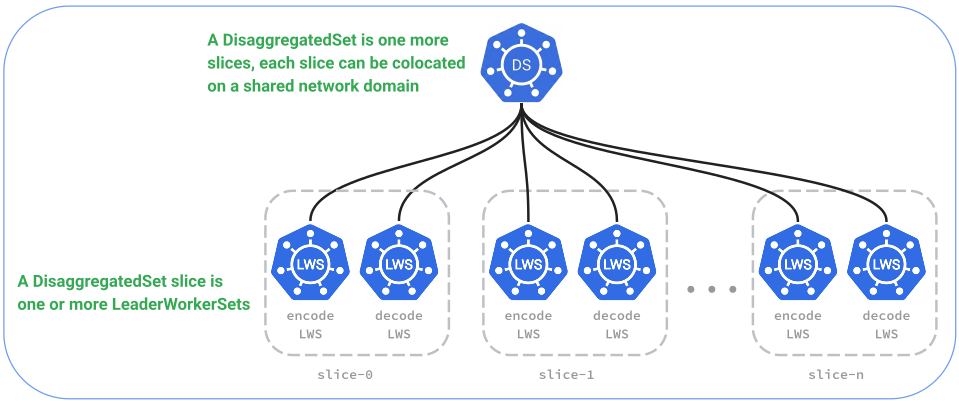
Relationship to LeaderWorkerSet
DisaggregatedSet does not replace LeaderWorkerSet — it orchestrates multiple LeaderWorkerSets.
Each role defined in a DisaggregatedSet spec maps to an independent LeaderWorkerSet, deployed
in the same namespace. Child LeaderWorkerSets use a slice index and a revision hash in their names:
DisaggregatedSet "my-inference"
├── roles[0]: prefill  →  LeaderWorkerSet "my-inference-0-<rev>-prefill"
├── roles[1]: decode   →  LeaderWorkerSet "my-inference-0-<rev>-decode"
└── roles[2]: encode   →  LeaderWorkerSet "my-inference-0-<rev>-encode"
Naming format: <DisaggregatedSet-name>-<slice>-<revision-hash>-<role-name>.
The revision hash is dynamic — always select child resources with labels
(disaggregatedset.x-k8s.io/name, disaggregatedset.x-k8s.io/role,
disaggregatedset.x-k8s.io/slice) rather than hardcoding names.
Each child LWS inherits standard LWS capabilities such as subgroup policies, exclusive placement, volume claim templates, and health monitoring. Rollout strategy for the set is owned by the DisaggregatedSet controller (see below).
Key Design Principles
-
LWS-native — DisaggregatedSet is built on top of LWS, not alongside it. This means LWS features (failure handling, subgroup topology, exclusive placement) are available per role. Note: rollout strategy is owned by the DisaggregatedSet controller, which replaces the per-LWS rollout to coordinate updates across roles.
-
Coordinated rollouts — Rollouts across roles are coordinated by DisaggregatedSet to preserve capacity ratios (e.g., prefill-to-decode ratio) throughout the update process. Each role's
rolloutStrategy.rollingUpdateConfigurationsets itsmaxSurgeandmaxUnavailable, defaulting tomaxSurge: 0, maxUnavailable: 1like a LeaderWorkerSet, so a rollout needs no capacity beyond the role's replicas. SetmaxSurge: 1, maxUnavailable: 0on a role to bring the new revision up before the old one drains. Partition-based rollout is not supported. -
Declarative — The entire multi-role inference topology is expressed in a single YAML manifest, making it easy to version-control and apply via GitOps.
Rollout availability
Each role's maxUnavailable limits how many of its groups can be unavailable.
For fixed replica targets, its availability floor is
max(0, replicas - maxUnavailable). If a required role still present in the target
has a floor of zero, the controller may remove its last old group without
waiting for every role in that old revision to retire together. Other roles
retain their own Ready-group floors, even while the old revision is incomplete.
This can interrupt service: a revision needs a Ready group in every required
role to serve traffic. For example, explicitly setting maxUnavailable: 1
permits a singleton Prefill role to be entirely unavailable, just like 100%.
A fixed 1 Prefill / 2 Decode update with explicit maxSurge: 0 and
maxUnavailable: 1 on both roles can drain old 1P/2D to 0P/1D, start new 1P/1D,
then replace the remaining old Decode once the new Decode is Ready. Three
equal-size group slots suffice. The old Decode continues to count against its
own budget after Prefill is removed.
When every required current role has a positive floor, the controller also
preserves complete-revision serving capacity. A merely unhealthy peer does not
waive that protection. Keeping a singleton role continuously available requires
maxUnavailable: 0 and a positive maxSurge, and can require spare capacity.
Bootstrap recovery can also require an extra group; scheduler rejection never
automatically lowers a positive availability floor to zero.
Scaling during a rollout
This applies to static roles[].spec.replicas and External RoleScaler targets. Changing replicas or the scaling policy does not create a new revision.
scalingPolicy.scaleDownDuringRollout | Scale-up during a rollout | Scale-down during a rollout |
|---|---|---|
Deferred (default) | Adds target-revision replicas toward the requested count, within rollout budgets. | Defers shrinking already-created target replicas until old revisions drain. Old replicas can still be retired during the rollout. |
Immediate | Adds target-revision replicas toward the requested count, within rollout budgets. | Tries to remove excess old replicas first. If they must remain to serve traffic, it can shrink excess target replicas instead. |
To allow scale-down before old revisions finish draining:
spec:
  scalingPolicy:
    scaleDownDuringRollout: Immediate
Omitting the policy preserves Deferred behavior. Immediate means the controller considers reductions now, not that Pods disappear instantly: availability and startup safeguards can delay them.
For roles still required by the target, both old and target reductions protect effective desired - maxUnavailable Ready groups, with a minimum of zero. The effective count normally follows the latest request; under Deferred, an External role with overlapping old replicas keeps at least the already-created target count. Requesting more capacity raises this floor. If fewer groups are currently Ready, the controller preserves those groups while growing the target; a smaller old revision is not permission to reduce availability further.
If ordinary scale-up becomes blocked by coordination, either policy can use one temporary extra group per eligible role. That role's existing target groups must all be Ready and its total Spec must be at its surge ceiling. The extra cannot stack while the role remains over its ceiling or waits for readiness. This does not enable Deferred to shrink the target in response to a lower replica request.
When an Immediate target revision has more replicas than its latest desired count, both Ordinal and Hash follow the same rule for each role:
- If any target Pod is assigned to a node, even if it is still loading, keep at least the final desired count. The same protection applies when scheduling information is incomplete.
- If every target group is confirmed unscheduled, the count may go below desired toward
desired + maxSurge - old replicas. Availability checks and the first group of each required role still limit that reduction. This does not shrink a target already at or below desired.
For example, per role: old Spec/Ready 4, target Spec 5 with none Ready, desired 4, maxSurge: 1, and maxUnavailable: 0. A scheduled target can reduce to 4; an entirely unscheduled target can reduce to 1. The first case keeps 8 total groups above the latest ceiling of 5 until new readiness permits old groups to drain, potentially for a long time if startup stalls.
This protects the replica count, not particular Pods. It can keep some unscheduled groups alongside scheduled ones; removing excess above desired can still delete scheduled work, and placement may change before deletion.
Renamed-role rollouts can start a bounded next batch using Ready replacements without waiting for another old group to leave; if a target role later loses all Ready groups, recovery under either policy may reclaim extra groups, even Ready ones, while preserving the last Ready group per role and protected old capacity. Immediate finishes when old replicas are gone and target Spec and Ready equal the latest desired count, including zero.
See KEP-1022 for the exact budgets, renamed-role availability, and recovery rules.
This project provides two complementary Kubernetes APIs for distributed AI/ML workloads: LeaderWorkerSet (LWS) (leaderworkerset.x-k8s.io/v1) and DisaggregatedSet (DS) (disaggregatedset.x-k8s.io/v1).
Architecture: Two Complementary APIs
LeaderWorkerSet and DisaggregatedSet work together in a layered architecture:
- LeaderWorkerSet (LWS) (
leaderworkerset.x-k8s.io/v1): A foundational API for deploying a group of pods as a single unit of replication. LWS addresses multi-node model-parallel inference where pods within a replica share fate, require tight co-location, and communicate via high-speed interconnects. - DisaggregatedSet (DS) (
disaggregatedset.x-k8s.io/v1): A higher-level orchestration API designed for disaggregated inference architectures (e.g., separating prefill and decode phases). DisaggregatedSet manages and coordinates multiple underlying LeaderWorkerSets as distinct roles within a unified logical workload. DisaggregatedSet uses LeaderWorkerSet as a core primitive, it composes multiple LeaderWorkerSets into a complete serving topology, handling cross-role coordination that individual pod groups cannot manage alone.
┌─────────────────────────────────────────────────────────────┐
│                    DisaggregatedSet                         │
│  (Multi-role orchestration, ratio-preserving rollouts,      │
│   service discovery, slice management, coordinated drain)   │
└──────────────┬───────────────────────────────┬──────────────┘
               │                               │
               ▼                               ▼
  ┌─────────────────────────┐     ┌─────────────────────────┐
  │ LeaderWorkerSet (Role 1)│     │ LeaderWorkerSet (Role 2)│
  │     e.g., Prefill       │     │      e.g., Decode       │
  ├─────────────────────────┤     ├─────────────────────────┤
  │ • Pod group lifecycle   │     │ • Pod group lifecycle   │
  │ • Leader/worker template│     │ • Leader/worker template│
  │ • Exclusive topology    │     │ • Exclusive topology    │
  │ • Subgroup scheduling   │     │ • Subgroup scheduling   │
  │ • Failure restart policy│     │ • Failure restart policy│
  └─────────────────────────┘     └─────────────────────────┘
Comparison Matrix
| Feature / Dimension | LeaderWorkerSet (LWS) | DisaggregatedSet (DS) |
|---|---|---|
| Primary Purpose | Deploying a group of pods as a unit of replication | Orchestrating multi-role disaggregated serving topologies |
| Unit of Replication | Replica = 1 leader Pod + N worker Pods | Set = Multiple roles, each mapped to a child LWS |
| Workload Type | Homogeneous multi-node inference | Heterogeneous multi-role inference (prefill, decode, encode) |
| CRD | leaderworkerset.x-k8s.io/v1 | disaggregatedset.x-k8s.io/v1 |
| Rollout Ownership | LWS controller (maxUnavailable, maxSurge) | DisaggregatedSet controller (lockstep, ratio-preserving) |
| Scaling | Horizontal Pod Autoscaler (HPA) via scale subresource | Independent per-role scaling & full topology slice scaling |
| Service Discovery | Headless service per replica (UniquePerReplica subdomain policy) | Headless service per role with revision-aware routing |
| Placement & Topology | Exclusive topology placement & subgroups per replica | Slice-level placement policy and topology spread |
| Failure Handling & Lifecycle | Per-replica restart policies (RecreateGroupOnPodRestart, None, RecreateGroupAfterStart), isolating failure recovery to the affected pod group | Per-role LWS failure handling; coordinated rollout and drain across all roles |
When to Use Which API
Use LeaderWorkerSet when:
- All inference pods are homogeneous (same model sharding, same hardware requirements across all nodes).
- You do not need to separate prefill from decode (e.g., running standard tensor-parallel inference with vLLM, SGLang, or TensorRT-LLM).
- You need fine-grained control over pod subgroup placement or group restart policies within a single pod group.
Use DisaggregatedSet when:
- You are deploying disaggregated LLM inference (e.g., vLLM with P/D disaggregation, SGLang, or llm-d) where distinct phases (such as prefill and decode) require different GPU types, different container images, or different pod group sizes.
- You want to scale prefill and decode replicas independently based on traffic patterns (e.g., prompt length vs. generation length).
- You require coordinated, lockstep rollouts across multiple roles without disrupting serving ratios or dropping requests.
- You want declarative management of a complex multi-role topology in a single Kubernetes manifest.
- You are evaluating or adopting disaggregated serving architectures with first-class Kubernetes support.
Roles in DisaggregatedSet
A Role in DisaggregatedSet represents a distinct operational phase in a disaggregated serving architecture (e.g., prefill, decode, or encode). Each role defines its own pod specifications, scaling properties, and replica topology.
Relationship to Child LeaderWorkerSets
Each role defined in a DisaggregatedSet specification maps directly to an independent child LeaderWorkerSet managed by the DisaggregatedSet controller:
DisaggregatedSet "my-inference"
├── roles[0]: prefill  →  LeaderWorkerSet "my-inference-0-<rev>-prefill"
├── roles[1]: decode   →  LeaderWorkerSet "my-inference-0-<rev>-decode"
└── roles[2]: encode   →  LeaderWorkerSet "my-inference-0-<rev>-encode"
Child LeaderWorkerSets follow the naming convention:
<DisaggregatedSet-name>-<slice>-<revision-hash>-<role-name>
The revision hash in the child resource name is dynamic across updates. Always select child resources using Kubernetes labels (disaggregatedset.x-k8s.io/name, disaggregatedset.x-k8s.io/role, disaggregatedset.x-k8s.io/slice) rather than hardcoding names.
Role Configuration Fields
A DisaggregatedSet spec defines a roles list where each entry represents a role (DisaggregatedRoleSpec):
| Field | Type | Description |
|---|---|---|
name | string | Unique name for this role within the set (e.g., prefill, decode, encode). |
scaling | RoleScaling | Optional scaling configuration. scaling.mode: External delegates replica management to an external autoscaler (e.g., HPA/KEDA via DisaggregatedSetRoleScaler). Default is Static. |
spec.replicas | *int32 | Number of LWS replicas (pod groups) for this role per slice. |
spec.leaderWorkerTemplate | LeaderWorkerTemplate | Full pod template defining the leader and worker pod containers, resource requests/limits, restart policies, and subgroup configurations for this role. |
spec.rolloutStrategy | RolloutStrategy | Optional rolling update configuration for this role. DisaggregatedSet coordinates updates across roles to maintain capacity ratios. |
Example Multi-Role Configuration
Here is an example DisaggregatedSet defining independent prefill and decode roles with different pod group sizes and hardware accelerator configurations:
apiVersion: disaggregatedset.x-k8s.io/v1
kind: DisaggregatedSet
metadata:
  name: disaggregatedset-sample
spec:
  roles:
  - name: prefill
    spec:
      replicas: 2
      leaderWorkerTemplate:
        size: 4
        workerTemplate:
          spec:
            containers:
            - name: vllm-prefill
              image: vllm/vllm-openai:latest
              resources:
                limits:
                  nvidia.com/gpu: "8"
  - name: decode
    spec:
      replicas: 4
      leaderWorkerTemplate:
        size: 2
        workerTemplate:
          spec:
            containers:
            - name: vllm-decode
              image: vllm/vllm-openai:latest
              resources:
                limits:
                  nvidia.com/gpu: "4"
Independent Per-Role Capabilities
Because each role maps to an independent child LeaderWorkerSet, each role inherits all core LWS features tailored to its specific workload phase:
- Heterogeneous Hardware: Prefill servers can run on high-bandwidth, high-compute accelerator nodes (e.g., 8-GPU tensor-parallel groups), while decode servers run on memory-optimized nodes (e.g., 2-GPU or 4-GPU groups).
- Independent Group Sizes:
Each role configures its own
leaderWorkerTemplate.sizeand optionalsubGroupPolicy. - Independent Autoscaling:
Prefill and decode roles can be scaled dynamically based on distinct metric signals (e.g., time-to-first-token vs. inter-token-latency) using
DisaggregatedSetRoleScaler. - Dedicated Storage:
Each role can configure its own
volumeClaimTemplatesfor local model caching or intermediate tensor offloading.
Virtual roles
subRoles: [{name: interactive, replicas: 3}, {name: batch, replicas: 1}] partitions
one parent's shared-template LWS into routing pools, totaling four groups per slice.
Parent spec.replicas is ignored and parent scaling must be omitted. Children may
use scaling.mode: External without replicas; their <ds>-<parent>-<child> RoleScalers
retain the single-slice restriction. Both Ordinal and Hash group identities are supported.
Route using the controller-owned disaggregatedset.x-k8s.io/subrole Pod label alongside
set/role/slice labels. Each child inherits independent rollout budgets; there is no parent cap.
Set maxSurge or maxUnavailable directly on a sub-role to override that setting:
subRoles:
- name: interactive
  replicas: 3
  maxSurge: 1
  maxUnavailable: 0
- name: batch
  replicas: 1
  maxUnavailable: 1
Omitted settings still inherit the parent; explicit zero is not omission. Percentages use the child's own replica target (surge rounds up, unavailability rounds down). Changing these settings adjusts rollout pacing without creating a new revision.
status.roleStatuses lists parent aggregates, with current children nested in
subRoleStatuses using local names such as interactive. Use the parent total or the
child breakdown, not their sum. SubRolesAssigned reports coherent group assignment.
Labels can briefly duplicate during transfers. Ordinal requires a healthy retained prefix;
Hash prepares assignments using accepted per-child Ready floors. Pending operations block
further planning and desired changes until they complete.
Hash scale-down uses Kubernetes controller.kubernetes.io/pod-deletion-cost to prefer
removing unwanted groups. ReplicaSet first prefers unscheduled leaders, then compares
phase (Pending before Unknown before Running), then prefers not-Ready leaders, and only
then considers cost. This is intentional: keeping scheduled, healthy leaders takes
priority over our subrole preference. Selection remains best-effort: these checks concern
the leader, not the whole group, and ReplicaSet may not yet have observed a cost update.
For example, scaling A=5,B=1 to A=4,B=1 can temporarily remove B's only Ready group.
The controller observes the actual survivors and repairs their labels; it cannot guarantee
each child's availability budget during that interval. The planner still applies independent
budgets. The previous deletion cost is saved on the Pod and restored if it survives,
without overwriting newer external edits. There is no deletion webhook, and DisaggregatedSet
does not delete Pods directly. The normal default-enabled PodDeletionCost feature must be
enabled for the preference to apply.
See KEP-960 for assignment ordering, recovery, rollout churn, and removing subroles.
Slices in DisaggregatedSet
A Slice in DisaggregatedSet (introduced in KEP-846) represents a complete, self-contained replica of the entire multi-role serving topology (e.g., a full pair of prefill and decode roles).
Configured via the top-level spec.slices field, slices allow you to scale and duplicate an entire disaggregated inference architecture as a single declarative unit.
DisaggregatedSet "my-inference" (spec.slices = 2)
│
├── Slice 0 (e.g., Rack A / Domain 0)
│   ├── Role "prefill" → LeaderWorkerSet "my-inference-0-<rev>-prefill"
│   └── Role "decode"  → LeaderWorkerSet "my-inference-0-<rev>-decode"
│
└── Slice 1 (e.g., Rack B / Domain 1)
    ├── Role "prefill" → LeaderWorkerSet "my-inference-1-<rev>-prefill"
    └── Role "decode"  → LeaderWorkerSet "my-inference-1-<rev>-decode"
Why Use Slices?
1. Scaling Identical Topologies Without YAML Duplication
Running multiple identical copies of a multi-role serving setup previously required duplicating manifests or creating multiple DisaggregatedSet resources. With spec.slices, scaling from 1 to N identical copies is a single-line configuration change:
apiVersion: disaggregatedset.x-k8s.io/v1
kind: DisaggregatedSet
metadata:
  name: disaggregatedset-sample
spec:
  slices: 3
  roles:
  - name: prefill
    spec:
      replicas: 2
      leaderWorkerTemplate:
        size: 4
        workerTemplate:
          spec:
            containers:
            - name: vllm-prefill
              image: vllm/vllm-openai:latest
  - name: decode
    spec:
      replicas: 4
      leaderWorkerTemplate:
        size: 2
        workerTemplate:
          spec:
            containers:
            - name: vllm-decode
              image: vllm/vllm-openai:latest
2. Accelerator Domain Confinement & Fault Isolation
Disaggregated inference architectures (such as vLLM or SGLang with KV-cache transfer) benefit when prefill and decode pods communicating with each other are confined to the same physical domain (e.g., an NVLink rack or high-bandwidth switch).
- Each slice provides a stable unit of identity that can be pinned or spread across physical topology domains.
- A failure or network disruption in one domain affects only that slice, while other slices continue serving traffic uninterrupted.
3. Independent Rolling Updates per Slice
Each slice operates as an independent rolling update domain:
- When a pod template or image is updated, the controller rolls out updates across slices independently.
- Each slice maintains a version-synchronized serving topology (e.g., prefill and decode are updated in lockstep within the slice).
- Transient version differences between separate slices during a rollout do not break intra-slice KV cache transfer.
4. Zero-Downtime Scaling
Modifying spec.slices is treated strictly as a scale operation:
- Scale-Up: Adding a slice (e.g., increasing
slicesfrom 2 to 3) creates the new slice at the current active revision without restarting or modifying existing slices. - Scale-Down: Reducing
slicesdeletes the highest-indexed slice and gracefully terminates its child LeaderWorkerSets.
Naming and Identification
Child resources belonging to a slice include the slice index in their name and labels:
Resource Naming Format
<DisaggregatedSet-name>-<slice-index>-<revision-hash>-<role-name>
Example for slices: 2:
my-inference-0-7f9b8c21-prefillmy-inference-0-7f9b8c21-decodemy-inference-1-7f9b8c21-prefillmy-inference-1-7f9b8c21-decode
Kubernetes Labels
Every child resource is labeled with:
disaggregatedset.x-k8s.io/name: Name of the parent DisaggregatedSetdisaggregatedset.x-k8s.io/slice: Slice index ("0","1", ...)disaggregatedset.x-k8s.io/role: Role name ("prefill","decode")
Placement Policy in DisaggregatedSet
Disaggregated inference workloads have strict placement requirements:
- Intra-Slice Locality: Prefill and decode pods within the same slice exchange KV-cache data over high-speed networks and should be co-located within the same low-latency domain (such as an NVL72 rack or InfiniBand island).
- Inter-Slice Isolation: Slices of the same DisaggregatedSet should be spread across distinct physical domains so that hardware or power failures take down at most one slice.
- Domain Exclusivity: Highly sensitive production workloads may require exclusive access to an accelerator domain to prevent noisy-neighbor performance degradation.
DisaggregatedSet provides the spec.placementPolicy API (introduced in KEP-848) to declaratively manage these constraints.
Placement Policy Types
The spec.placementPolicy field defines the placement strategy and the target topology node-label key:
spec:
  placementPolicy:
    type: ExclusiveSlice # or None, ExclusiveTopology
    topology: topology.kubernetes.io/rack
1. None (Default)
The controller injects no placement constraints. Pods for all roles and slices are scheduled according to standard Kubernetes scheduling rules and any explicit node selectors or affinities defined directly on the pod templates.
2. ExclusiveSlice
- Co-location: All roles (e.g. prefill and decode) belonging to the same slice are co-located in the same topology domain.
- Spread: Different slices of the same DisaggregatedSet are scheduled onto separate topology domains.
- Sharing: Slices from other DisaggregatedSets or other cluster workloads are permitted to share the domain if capacity allows.
Use Case: Cost-efficient production serving where you want low-latency KV-cache handoff within each slice and fault isolation across your slices, while allowing dense cluster bin-packing.
3. ExclusiveTopology
- Co-location & Spread: Performs everything
ExclusiveSlicedoes (co-locates roles within a slice and spreads slices across domains). - Exclusivity Among DisaggregatedSets: Ensures that a topology domain holds at most one slice across all DisaggregatedSets (a 1:1 domain-to-slice mapping). Pods from other DisaggregatedSet slices are prevented from landing in the same domain.
Exclusivity is enforced via injected pod anti-affinity targeting DisaggregatedSet labels. Unrelated, non-DisaggregatedSet workloads do not match this anti-affinity and can still share the domain unless node taints or dedicated node pools are configured.
Use Case: Production serving workloads that require dedicated accelerator domains without interference from other DisaggregatedSet slices.
Comparison Matrix
| Policy Type | Intra-Slice Co-location | Inter-Slice Spread (Same Set) | Sharing with Other DisaggregatedSets |
|---|---|---|---|
None | ❌ None | ❌ None | ✅ Allowed |
ExclusiveSlice | ✅ Same domain | ✅ Different domains | ✅ Allowed |
ExclusiveTopology | ✅ Same domain | ✅ Different domains | ❌ Disallowed (1:1 Domain Mapping) |
Example Configuration
Below is an example DisaggregatedSet configured with ExclusiveSlice placement across physical racks:
apiVersion: disaggregatedset.x-k8s.io/v1
kind: DisaggregatedSet
metadata:
  name: disaggregatedset-sample
spec:
  slices: 2
  placementPolicy:
    type: ExclusiveSlice
    topology: topology.kubernetes.io/rack
  roles:
  - name: prefill
    spec:
      replicas: 2
      leaderWorkerTemplate:
        size: 4
        workerTemplate:
          spec:
            containers:
            - name: vllm-prefill
              image: vllm/vllm-openai:latest
              resources:
                limits:
                  nvidia.com/gpu: "8"
  - name: decode
    spec:
      replicas: 4
      leaderWorkerTemplate:
        size: 2
        workerTemplate:
          spec:
            containers:
            - name: vllm-decode
              image: vllm/vllm-openai:latest
              resources:
                limits:
                  nvidia.com/gpu: "4"
In this example:
- Slice 0 (prefill + decode pods) lands together on Rack A.
- Slice 1 (prefill + decode pods) lands together on Rack B.
How It Works Under the Hood
The DisaggregatedSet controller translates placementPolicy into Kubernetes podAffinity and podAntiAffinity rules and injects them into the generated child LeaderWorkerSet pod templates:
- Pod Affinity (Co-location):
Injected so that pods matching the parent DisaggregatedSet name and slice index (
disaggregatedset.x-k8s.io/slice) must be scheduled in the sametopologyKeydomain. - Pod Anti-Affinity (Spread & Exclusivity):
Injected so that pods matching the parent DisaggregatedSet with a different slice index (or any DisaggregatedSet for
ExclusiveTopology) cannot land in the same domain. - Hardware Agnostic:
The
topologyfield uses standard Kubernetes node labels (e.g.,topology.kubernetes.io/rack,cloud.google.com/gke-placement-group,topology.kubernetes.io/zone), making the placement policy fully portable across GPU, TPU, and CPU clusters. - Rollout Semantics:
Affinity rules are injected when child LeaderWorkerSets are created. Changing
placementPolicyon an active DisaggregatedSet takes effect on the next rollout.
Independent Role Autoscaling
In disaggregated serving architectures, different roles experience fundamentally different bottlenecks:
- Prefill: Compute-bound and sensitive to request queue depth and prompt token volume.
- Decode: Memory-bandwidth-bound and sensitive to active batch size and KV-cache capacity.
To maximize accelerator utilization and cost efficiency, each role must be able to autoscale independently.
However, because child LeaderWorkerSets include dynamic revision hashes in their names (<ds>-<slice>-<rev>-<role>), pointing a standard Kubernetes HorizontalPodAutoscaler (HPA) directly at an underlying LWS breaks whenever a rolling update occurs.
DisaggregatedSetRoleScaler (disaggregatedset.x-k8s.io/v1, introduced in KEP-849) solves this by exposing a stable /scale subresource target per role that persists across arbitrary rollouts.
How It Works
┌─────────────────────────────────────────────────────────────┐
│             HPA / KEDA ScaledObject / Custom Scaler         │
│          (Target: kind=DisaggregatedSetRoleScaler)          │
└──────────────────────────────┬──────────────────────────────┘
                               │  /scale subresource
                               ▼
┌─────────────────────────────────────────────────────────────┐
│  DisaggregatedSetRoleScaler: "<ds-name>-<role-name>"        │
│  (Controller-managed, stable name across all revisions)     │
└──────────────────────────────┬──────────────────────────────┘
                               │  Reconciles desired replicas
                               ▼
┌─────────────────────────────────────────────────────────────┐
│                    DisaggregatedSet Controller              │
│       (Manages child LWS lifecycle, rollouts, and drain)    │
└──────────────────────────────┬──────────────────────────────┘
                               │
                               ▼
┌─────────────────────────────────────────────────────────────┐
│  Child LeaderWorkerSet: "<ds-name>-0-<revision>-<role-name>"│
└─────────────────────────────────────────────────────────────┘
- Automatic Lifecycle: When you set
scaling.mode: Externalon a role, the DisaggregatedSet controller automatically creates and maintains aDisaggregatedSetRoleScalernamed<disaggregatedset-name>-<role-name>. You do not need to author this resource manually. - Stable Target: The scaler's name remains constant regardless of how many rolling updates or revision changes occur.
- Reconciled Replicas: The external autoscaler (HPA or KEDA) writes the desired replica count to the scaler's
/scaleendpoint. The DisaggregatedSet controller reads this value and scales the corresponding child LeaderWorkerSet accordingly. - Observable Target: The DisaggregatedSet reports the target it is driving each role toward in
status.roleStatuses[].desiredReplicas, next to itsreplicas,readyReplicasandupdatedReplicas, so you can check a role's progress without reading its scaler. The field is unset until the scaler exists.
External role scaling (scaling.mode: External) currently requires spec.slices: 1 (or omitted, which defaults to 1). Admission validation rejects configurations with slices > 1 when any role uses scaling.mode: External.
Configuration Example
1. Enable External Scaling on the Role
In your DisaggregatedSet manifest, set scaling.mode: External on the role(s) you wish to autoscale:
apiVersion: disaggregatedset.x-k8s.io/v1
kind: DisaggregatedSet
metadata:
  name: llm-serving
spec:
  roles:
  - name: prefill
    scaling:
      mode: External
    spec:
      leaderWorkerTemplate:
        size: 4
        workerTemplate:
          spec:
            containers:
            - name: vllm-prefill
              image: vllm/vllm-openai:latest
              resources:
                requests:
                  cpu: "16"
                limits:
                  nvidia.com/gpu: "8"
  - name: decode
    spec:
      replicas: 4
      leaderWorkerTemplate:
        size: 2
        workerTemplate:
          spec:
            containers:
            - name: vllm-decode
              image: vllm/vllm-openai:latest
              resources:
                limits:
                  nvidia.com/gpu: "4"
2. Create an HPA Targeting the Role Scaler
Target the automatically created DisaggregatedSetRoleScaler by name (<ds-name>-<role-name>):
apiVersion: autoscaling/v2
kind: HorizontalPodAutoscaler
metadata:
  name: prefill-hpa
spec:
  scaleTargetRef:
    apiVersion: disaggregatedset.x-k8s.io/v1
    kind: DisaggregatedSetRoleScaler
    name: llm-serving-prefill
  minReplicas: 2
  maxReplicas: 10
  metrics:
  - type: Resource
    resource:
      name: cpu
      target:
        type: Utilization
        averageUtilization: 80
3. (Optional) KEDA ScaledObject Example
For event-driven autoscaling based on Prometheus metrics (such as vLLM queue depth or TTFT):
apiVersion: keda.sh/v1alpha1
kind: ScaledObject
metadata:
  name: prefill-keda-scaler
spec:
  scaleTargetRef:
    apiVersion: disaggregatedset.x-k8s.io/v1
    kind: DisaggregatedSetRoleScaler
    name: llm-serving-prefill
  minReplicaCount: 2
  maxReplicaCount: 20
  triggers:
  - type: prometheus
    metadata:
      serverAddress: http://prometheus-k8s.monitoring.svc:9090
      metricName: vllm_num_requests_waiting
      query: sum(vllm_num_requests_waiting{model="meta-llama/Llama-3-70b"})
      threshold: "10"
Key Benefits
- Independent Scaling Curves: Scale prefill aggressively based on request surges while keeping decode capacity stable or scaling on memory pressure.
- Rollout Resilience: Active autoscalers remain attached and functional during rolling updates without reconfiguration.
- Declarative & Low-Touch: Zero custom CR authoring required — simply enable
mode: Externaland point your autoscaler at the deterministic scaler name.
Labels, Annotations and Environment Variables
Labels
| Key | Description | Example | Applies to |
|---|---|---|---|
leaderworkerset.sigs.k8s.io/name | The name of the LeaderWorkerSet object to which these resources belong. | leaderworkerset-multi-template | Pod, StatefulSet, Service |
leaderworkerset.sigs.k8s.io/template-revision-hash | Hash used to track the controller revision that matches a LeaderWorkerSet object. | 5c5fcdfb44 | Pod, StatefulSet |
leaderworkerset.sigs.k8s.io/group-index | The group to which it belongs. | 0 | Pod, StatefulSet (only worker) |
leaderworkerset.sigs.k8s.io/group-key | Unique key identifying the group. | 689ce1b5...b07 | Pod, StatefulSet (only worker) |
leaderworkerset.sigs.k8s.io/worker-index | The index or identity of the pod within the group. | 0 | Pod |
leaderworkerset.sigs.k8s.io/subgroup-index | Tracks which subgroup the pod is part of. | 0 | Pod (only if SubGroup is set) |
leaderworkerset.sigs.k8s.io/subgroup-key | Pods that are part of the same subgroup will have the same unique hash value. | 92904e74...801 | Pod (only if SubGroup is set) |
disaggregatedset.x-k8s.io/name | The name of the DisaggregatedSet object to which these resources belong. | disaggregatedset-sample | LeaderWorkerSet, Service, Pod |
disaggregatedset.x-k8s.io/role | The DisaggregatedSet role for the resource. | prefill | LeaderWorkerSet, Service, Pod |
disaggregatedset.x-k8s.io/slice | Slice index for the resource within the DisaggregatedSet. | 0 | LeaderWorkerSet, Service, Pod |
disaggregatedset.x-k8s.io/revision | Revision hash used to track a DisaggregatedSet rollout. | a1b2c3d4 | LeaderWorkerSet, Service, Pod |
Annotations
| Key | Description | Example | Applies to |
|---|---|---|---|
leaderworkerset.sigs.k8s.io/size | The total number of pods in each group. | 4 | Pod |
leaderworkerset.sigs.k8s.io/replicas | Replicas Number of leader-workers groups. | 3 | StatefulSet (only leader) |
leaderworkerset.sigs.k8s.io/leader-name | The name of the leader pod. | leaderworkerset-multi-template-0 | Pod (only worker) |
leaderworkerset.sigs.k8s.io/exclusive-topology | Specifies the topology for exclusive 1:1 scheduling. | cloud.google.com/gke-nodepool | LeaderWorkerSet, Pod (only if exclusive-topology is used) |
leaderworkerset.sigs.k8s.io/subdomainPolicy | Determines what type of domain will be injected. | UniquePerReplica | Pod (only if leader and subdomainPolicy set to UniquePerReplica) |
leaderworkerset.sigs.k8s.io/subgroup-size | The number of pods per subgroup. | 2 | Pod (only if SubGroup is set) |
leaderworkerset.sigs.k8s.io/subgroup-exclusive-topology | Specifies the topology for exclusive 1:1 scheduling within a subgroup. | topologyKey | LeaderWorkerSet, Pod (only if SubGroup is set and subgroup-exclusive-topology is used) |
leaderworkerset.sigs.k8s.io/leader-requests-tpus | Indicates if the leader pod requests TPU. | true | Pod (only if leader pod requests TPU) |
leaderworkerset.sigs.k8s.io/group-restart-counts | Stores restart budget consumed by each revision and replica group. | {"abc123/0":3} | LeaderWorkerSet (only if maxGroupRestarts is set) |
leaderworkerset.sigs.k8s.io/group-restart-budget-exhausted | Marks the retained leader after its group exhausts its restart budget. | true | Pod (only leader) |
leaderworkerset.sigs.k8s.io/recover | Set to true on a retained leader to explicitly recover its exhausted group. | true | Pod (only an exhausted leader) |
disaggregatedset.x-k8s.io/initial-replicas | Replica baseline used by the controller when the DisaggregatedSet revision becomes old. | 2 | LeaderWorkerSet |
Environment Variables
| Key | Description | Example | Applies to |
|---|---|---|---|
LWS_LEADER_ADDRESS | The address of the leader via the headless service. | leaderworkerset-multi-template-0.leaderworkerset-multi-template.default | Pod |
LWS_GROUP_SIZE | Tracks the size of the LWS group. | 4 | Pod |
LWS_WORKER_INDEX | The index or identity of the pod within the group. | 2 | Pod |
DISAGGREGATEDSET_NAME | The name of the parent DisaggregatedSet. | disaggregatedset-sample | Pod (only if managed by a DisaggregatedSet) |
DISAGGREGATEDSET_ROLE | The role of the pod within the DisaggregatedSet. | prefill | Pod (only if managed by a DisaggregatedSet) |
DISAGGREGATEDSET_SLICE | The slice index of the pod within the DisaggregatedSet. | 0 | Pod (only if managed by a DisaggregatedSet) |
DISAGGREGATEDSET_REVISION | The revision hash used to identify the DisaggregatedSet rollout. | a1b2c3d4 | Pod (only if managed by a DisaggregatedSet) |
TPU_WORKER_HOSTNAMES | Hostnames of TPU workers only in the same subgroup. | test-sample-1-5.default,test-sample-1-6.default,test-sample-1-7.default,test-sample-1-8.default | Pod (only if TPU enabled) |
TPU_WORKER_ID | ID of the TPU worker. | 0 | Pod (only if TPU enabled) |
TPU_NAME | Name of the TPU. | test-sample-1 | Pod (only if TPU enabled) |
Other labels and annotations can be exposed to a container with the Downward API.