Experimental: Data Parallel (DP) Aware WideEP Scheduling
This deployment uses DP-aware scheduling, where instead of letting vLLM automatically handle data parallelism internally, we explicitly launch separate vLLM server instances for each data parallel rank with a separate port for each rank. This enables the EPP to schedule requests directly to specific DP ranks, improving KV cache routing efficiency.
Discussion
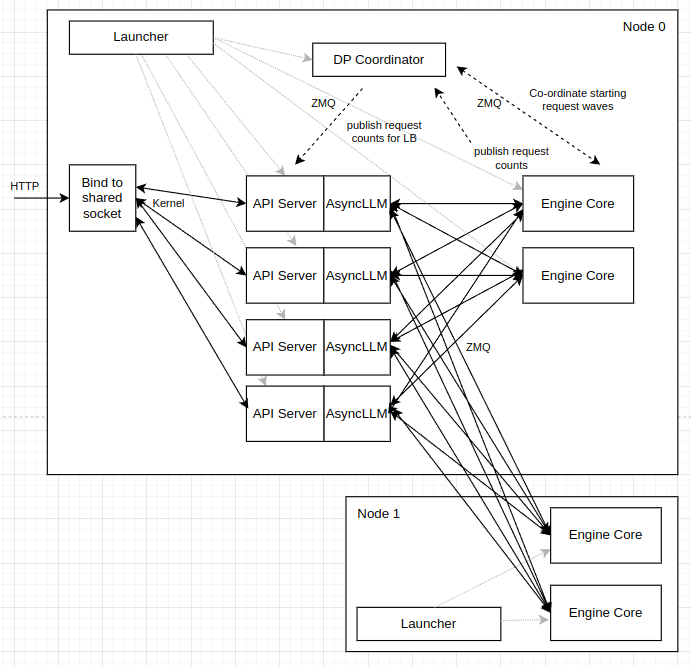
vLLM supports multiple "modes" for DP load balancing, including:
- internal, where vLLM manages DP-balancedness across all ranks. vLLM exposes a single API server endpoint and spreads load between ranks
- external, where an external router manages DP-balancedness. Each DP-rank exposes an API server endpoint and the external LB balances between these endpoints
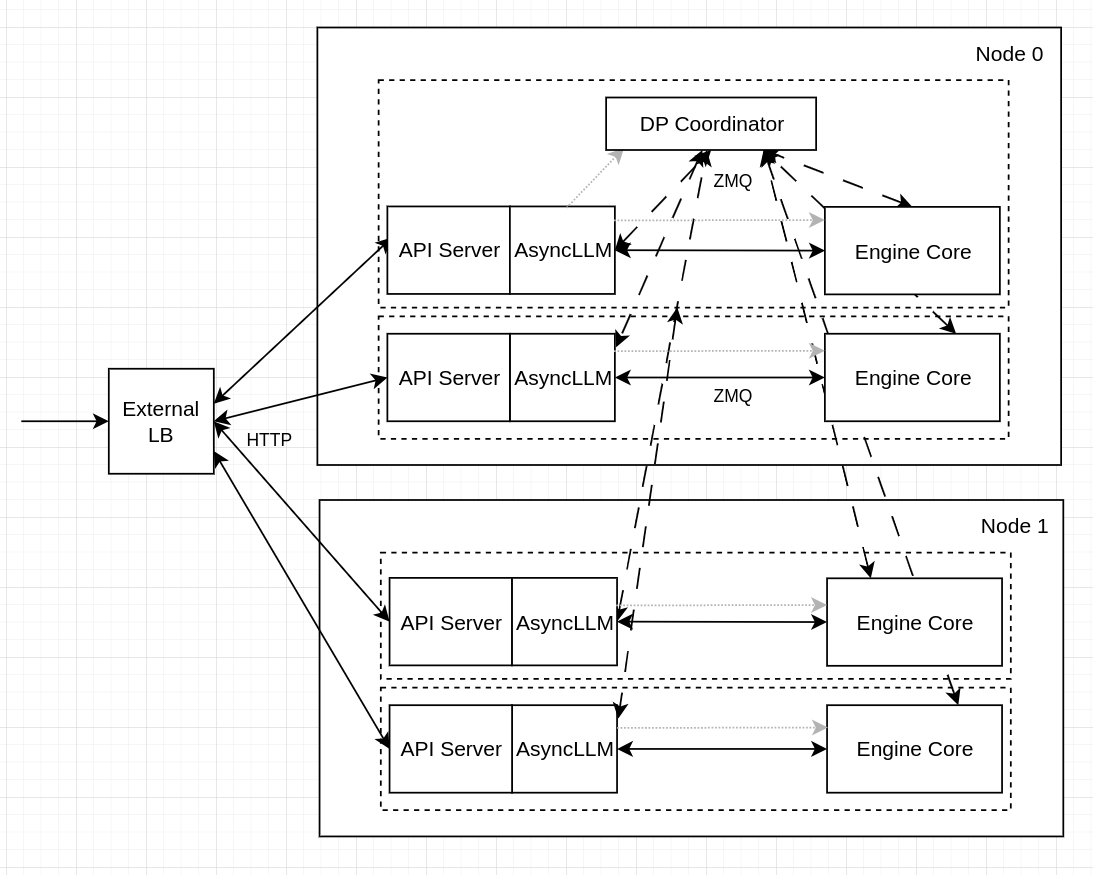
vLLM also has a hybrid mode, where a single API server is exposed PER-NODE. An external LB balances BETWEEN nodes and vLLM balances WITHIN a node.
In the context of llm-d, we want to use external load-balancing, so that the llm-d EPP is able to properly schedule requests with prefix-cache awareness, which requires targeting a specific DP-rank rather than a particular node. However, WideEP leverages DeepEP for the sparse dispatch/combine operations needed for WideEP. DeepEP uses cuda_ipc for intra-node traffic, which cannot cross pod-boundaries so using one-pod-per-dp-rank is not an option for WideEP deployments - we need to use one-pod-per-node. As a result, we have primarily been using vLLM's hybrid DP-load balancing mode - meaning llm-d's EPP is unable to schedule onto specific ranks (only can schedule at the node level), meaning that prefix-cache aware routing features from EPP have been incompatible with WideEP deployments.
Multi-Port Solution
To overcome this challenge, we instead launch 8 vLLM DP instances (each with a separate API endpoint) within a pod that has 8 visible GPUs (all the GPUs on a node). As a result, DeepEP is able to communicate over cuda_ipc within the node. Then, we configure the Gateway and InferencePool with multi-port support. The Gateway and EPP view each vLLM pod as a collection of 8 separate API endpoints and schedules onto each one of these endpoints directly.
We can, therefore, compose the WideEP deployment with the existing scorers (for example, prefix-cache-scorer and active-request-scorer) to balance load across the ranks and handle complex multi-turn request patterns.
Why This is Experimental
We are currently working on hardening the process management, health checking, and probes in vLLM to handle better this style of deployment. Once this is complete, we will upgrade this guide to the default.
Overview
This guide demonstrates how to deploy DeepSeek-R1-0528 using vLLM's P/D disaggregation support with NIXL in a wide expert parallel pattern with LeaderWorkerSets with DP-aware scheduling. This guide has been validated on:
- a 32xH200 cluster with InfiniBand networking
- a 32xB200 cluster with InfiniBand networking
- Istio 1.29.2 (required for multi-port support)
In this example, we will demonstrate a deployment of DeepSeek-R1-0528 with:
- 2 DP=8 Prefill Worker
- 1 DP=16 Decode Worker
Hardware Requirements
This guide requires 32 Nvidia H200 or B200 GPUs and InfiniBand or RoCE RDMA networking. Check modelserver/base/decode.yaml and modelserver/base/prefill.yaml for detailed resource requirements.
The pods leveraging inter-node EP must be deployed in a cluster environment with full mesh network connectivity. The DeepEP backend used in WideEP requires All-to-All RDMA connectivity. Every NIC on a host must be able to communicate with every NIC on all other hosts. Networks restricted to communicating only between matching NIC IDs (rail-only connectivity) will fail.
Prerequisites
-
Have the proper client tools installed on your local system to use this guide.
-
You have deployed the LeaderWorkerSet controller
-
Configure and deploy your Gateway control plane. Note that the Gateway must support multi-port (e.g. Istio 1.29.2)
-
Have the Monitoring stack installed on your system.
-
Create a namespace for installation.
export NAMESPACE=llm-d-wide-ep # or any other namespace (shorter names recommended)kubectl create namespace ${NAMESPACE} -
Create the
llm-d-hf-tokensecret in your target namespace with the keyHF_TOKENmatching a valid HuggingFace token to pull models.
Installation
cd guides/wide-ep-lws/experimental-dp-aware
Deploy Gateway and HTTPRoute
Deploy the Gateway and HTTPRoute using the gateway recipe.
Gateway options
To see what gateway options are supported refer to our gateway provider prereq doc. Gateway configurations per provider are tracked in the gateway-configurations directory.
You can also customize your gateway, for more information on how to do that see our gateway customization docs.
Deploy Model Servers
CoreWeave are tested Kubernetes providers for this well-lit path. You can customize the manifests if you run on other Kubernetes providers.
- CoreWeave
CoreWeave
kubectl apply -k ./manifests/modelserver/coreweave -n ${NAMESPACE}
Deploy InferencePool
Select the provider-specific Helm command using the tabs below.
Istio
helm install llm-d-infpool \
  -n ${NAMESPACE} \
  -f ./manifests/inferencepool.values.yaml \
  --set "provider.name=istio" \
  oci://registry.k8s.io/gateway-api-inference-extension/charts/inferencepool \
  --version v1.5.0
Verifying the installation
- Firstly, you should be able to list all helm releases installed into your chosen namespace:
helm list -n ${NAMESPACE}
NAME            NAMESPACE       REVISION    UPDATED                                 STATUS      CHART                       APP VERSION
llm-d-infpool   llm-d-wide-ep   1           2025-08-24 13:14:53.355639 -0700 PDT    deployed    inferencepool-v1.5.0   v0.3.0
- Out of the box with this example you should have the following resources (if using Istio):
kubectl get all -n ${NAMESPACE}
NAME                                                         READY   STATUS    RESTARTS   AGE
pod/infra-wide-ep-inference-gateway-istio-74d5c66c86-h5mfn   1/1     Running   0          2m22s
pod/wide-ep-llm-d-decode-0                                   2/2     Running   0          2m13s
pod/wide-ep-llm-d-decode-0-1                                 2/2     Running   0          2m13s
pod/llm-d-infpool-epp-84dd98f75b-r6lvh                       1/1     Running   0          2m14s
pod/wide-ep-llm-d-prefill-0                                  1/1     Running   0          2m13s
pod/wide-ep-llm-d-prefill-0-1                                1/1     Running   0          2m13s


NAME                                            TYPE           CLUSTER-IP    EXTERNAL-IP   PORT(S)                        AGE
service/infra-wide-ep-inference-gateway-istio   ClusterIP      10.16.1.34    10.16.4.2     15021:30312/TCP,80:33662/TCP   2m22s
service/wide-ep-ip-1e480070                     ClusterIP      None          <none>        54321/TCP                      2d4h
service/wide-ep-llm-d-decode                    ClusterIP      None          <none>        <none>                         2m13s
service/llm-d-infpool-epp                       ClusterIP      10.16.1.137   <none>        9002/TCP                       2d4h
service/wide-ep-llm-d-prefill                   ClusterIP      None          <none>        <none>                         2m13s

NAME                                                    READY   UP-TO-DATE   AVAILABLE   AGE
deployment.apps/infra-wide-ep-inference-gateway-istio   1/1     1            1           2m22s
deployment.apps/llm-d-infpool-epp                       1/1     1            1           2m14s

NAME                                                               DESIRED   CURRENT   READY   AGE
replicaset.apps/infra-wide-ep-inference-gateway-istio-74d5c66c86   1         1         1       2m22s
replicaset.apps/llm-d-infpool-epp-55bb9857cf                       1         1         1       2m14s

NAME                                                      READY   AGE
statefulset.apps/wide-ep-llm-d-decode     1/1     2m13s
statefulset.apps/wide-ep-llm-d-decode-0   1/1     2m13s
statefulset.apps/wide-ep-llm-d-prefill    1/1     2m13s
statefulset.apps/wide-ep-llm-d-prefill-1  1/1     2m13s
NOTE: This assumes no other guide deployments in your given ${NAMESPACE} and you have not changed the default release names via the ${RELEASE_NAME} environment variable.
Using the stack
For instructions on getting started making inference requests see our docs
NOTE: This example particularly benefits from utilizing stern as described in the getting-started-inferencing docs, because while we only have 3 inferencing pods, it has 16 vllm servers or ranks.
NOTE: Compared to the other examples, this one takes anywhere between 7-10 minutes for the vllm API servers to startup so this might take longer before you can interact with this example.
Benchmarking
This is a simple benchmarking setup to demonstrate the correctness of the implementation.